Smart Calendar Guide: Wall Displays vs. AI Scheduling Apps
Get the next article and product update in your inbox
Short product notes, fresh blog posts, and focus systems. No noisy sequence.

For years, my work life and home life were a chaotic dance of conflicting schedules. At home, my family struggled to keep track of soccer practices, appointments, and who was on dinner duty. At work, my calendar was a fortress of meetings, but my actual to-do list was a sprawling, untamed beast. I needed a smarter way to manage my time, so I went looking for the best smart calendar setup for both fronts.
That search took me down two very different paths: wall-mounted digital displays for my family, and an AI-powered scheduling app for my professional life. After using both, the difference became obvious. One is built for visibility. The other is built for execution.
In this guide, I’ll break down both categories and show you which kind of smart calendar is actually right for your situation.
What is a smart calendar today?
The term smart calendar no longer just means a calendar that syncs across devices. Today it usually refers to one of two very different products:
- Digital wall calendars: Physical touchscreen displays mounted in a shared location such as a kitchen. They combine multiple family calendars into one central view and function like a modern family command center.
- AI scheduling apps: Software tools that do more than display events. They analyze your tasks, priorities, deadlines, and availability, then automatically build a plan for your day. Tools like the AI-powered daily planner Fokus fall into this category.
The core difference is simple: one shows you your schedule, while the other helps create it.
For the home: why digital wall calendars took off
To solve our family scheduling chaos, I tested the most visible category of smart calendar hardware. The goal was straightforward: create one shared source of truth for a family of four that everyone could see and use without friction.
That appeal is real. Instead of multiple people checking different phones and asking the same questions across the house, a single screen shows the day, week, or month at a glance. For families, that can reduce miscommunication and lower the mental overhead of coordination.
Reviewing three popular wall displays
I focused on the most recognizable names in the category to see whether the premium price was justified.
Skylight Calendar Max (27”)
The Skylight Calendar Max is probably the device most people picture when they hear smart family calendar. Setup was easy, Google Calendar sync worked smoothly, and the color-coding immediately clicked for the kids. The chore-chart features were also genuinely useful.
At about $600 upfront plus a $3.99 monthly subscription for premium features, the three-year total cost of ownership lands close to $750. For its intended use case, that can be worth it. As a family visibility tool, it is polished and effective.
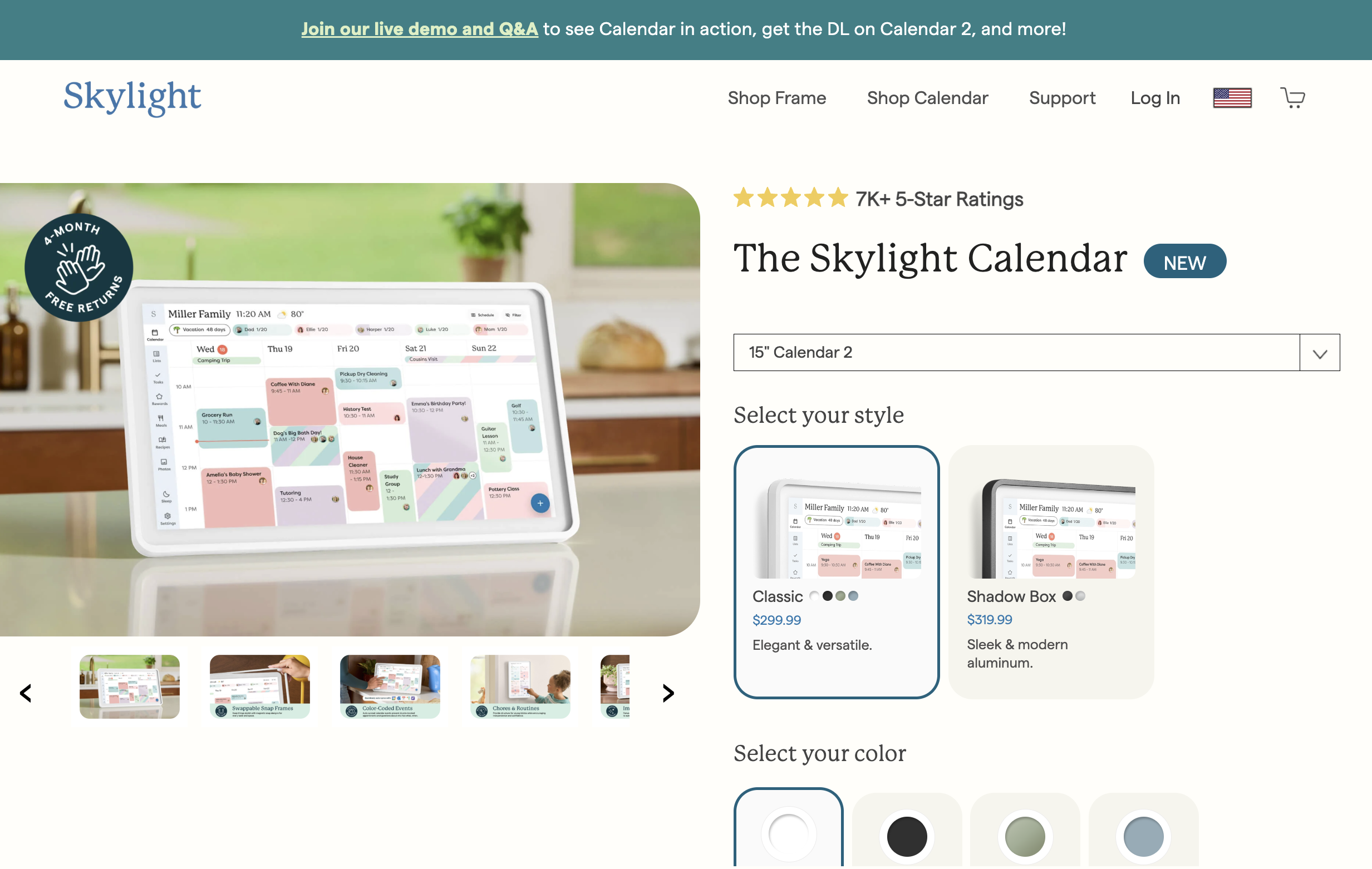
Skylight Calendar product page screenshot.
Hearth Display (27”)
The Hearth Display positions itself as a direct competitor to Skylight with a clean vertical interface and a heavier focus on family task management. It aims to be more than a calendar and more like a family operating system.
The experience is sleek, but it plays in the same premium price tier and often depends on subscription features to unlock the full value.
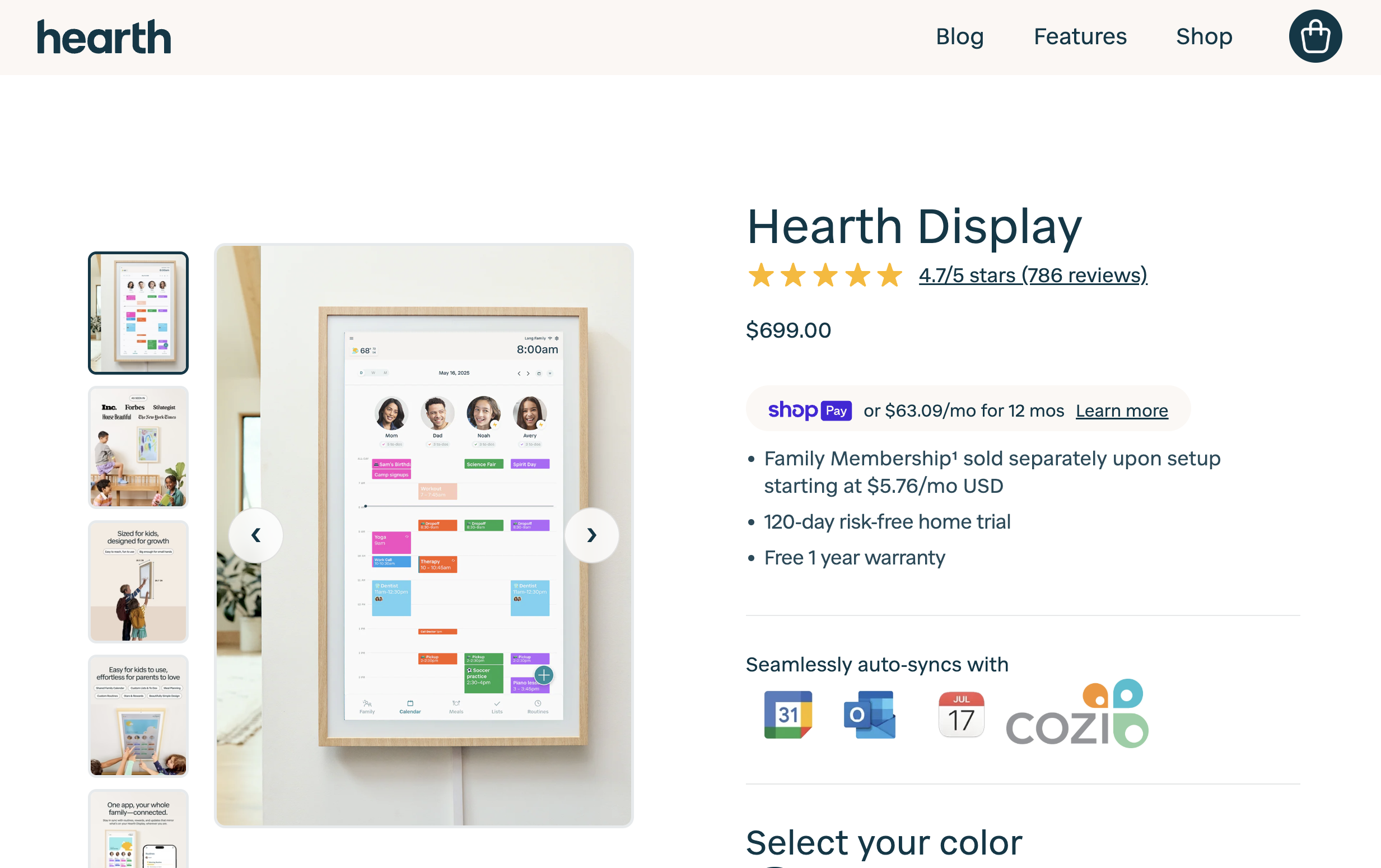
Hearth Display product page screenshot.
Apolosign (15.6”)
For smaller spaces or tighter budgets, Apolosign offers a more compact option. I liked the anti-glare matte display because it feels less like mounting a television in the kitchen.
Its lower upfront cost, usually around $300 to $400, makes it the most accessible entry point of the three. The trade-off is that it lacks some of the larger-screen presence and family-specific polish of the more expensive options.
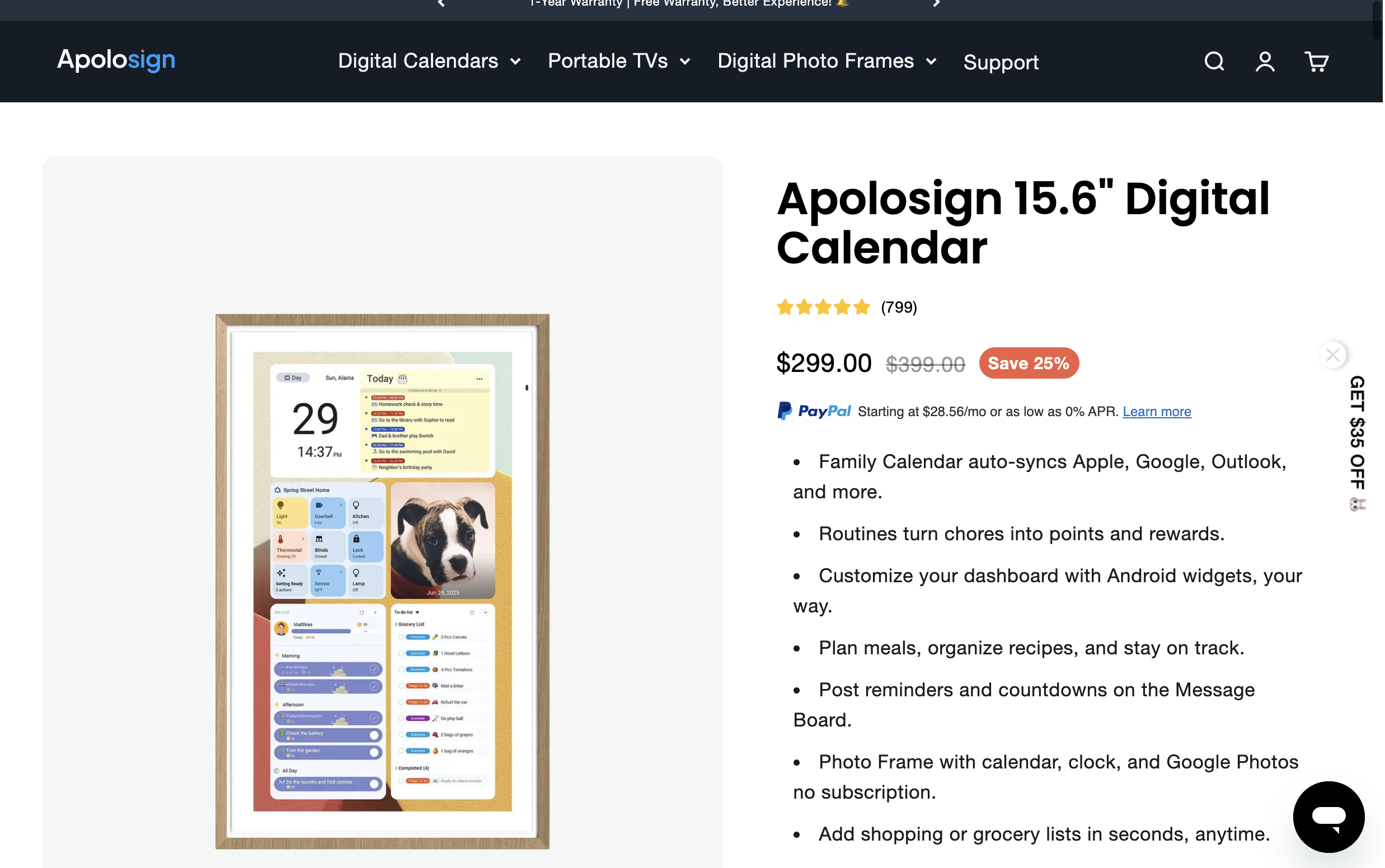
Apolosign 15.6-inch digital calendar product page screenshot.
The verdict on wall displays
For family coordination, digital wall calendars work. They create a visible, centralized source of truth. But they also have a clear ceiling.
They are passive displays.
They show obligations well, but they do not help you execute the work behind those obligations. And for my professional life, that is exactly where the real problem started.
For work: why AI smart calendar apps matter more
While the wall display brought order to home life, my professional calendar was still a problem. It was packed with meetings, but it offered almost no support for deep work. My task list still lived somewhere else, and I was constantly switching context to decide what to do next.
That constant context switching is expensive. The professional challenge is not just seeing your schedule. It is making sure your schedule actually supports meaningful output.
That is the gap AI smart calendar apps solve.
Instead of just syncing events, they connect to your tasks and intelligently place that work into the open space in your day. A wall display is the map. An AI planner is the system that actually routes you.
Hardware vs. software: which smart calendar is right for you?
Running both systems in parallel made the distinction very clear. The choice really comes down to whether you need shared visibility or personal execution.
| Category | Digital wall display | AI scheduling app |
|---|---|---|
| Best for | Families, households, shared home logistics | Professionals, freelancers, students, complex task loads |
| Primary function | Centralized display and sync | Automated scheduling and daily planning |
| Portability | Stationary | Available across laptop, phone, and tablet |
| Intelligence | Basic syncing and display logic | Predictive scheduling, prioritization, adaptation |
| Cost model | High upfront hardware cost plus possible subscription | Lower monthly SaaS pricing, often with a free trial |
| Key benefit | One visible source of truth for a group | Better focus and better execution for an individual |
If your problem is that nobody in the house knows what is happening this week, the wall display makes sense. If your problem is that your important work never gets real time on the calendar, an AI app is the better answer.
Why professionals need more than a display
As a professional, your most valuable asset is not information. It is attention.
A wall display cannot protect that. In many cases it only makes the overload more visible.
My workflow changed when I stopped just looking at my calendar and started letting software build it. A truly smart planning system can offer things hardware simply cannot:
- Dynamic time blocking: Instead of manually dragging tasks onto a calendar, AI finds the right place for them based on duration, urgency, and existing commitments. This is the practical foundation of time blocking your entire day without spending your morning on planning admin.
- Intelligent prioritization: When everything feels urgent, AI can weigh deadlines, dependencies, and stated goals to determine what deserves attention first.
- Deep work protection: The system can carve out uninterrupted blocks for your most important work instead of letting shallow tasks and meetings take over.
- Workflow integration: Real work lives in tools like Slack, Asana, Jira, and Trello. A true smart calendar integrates with your existing tools so planning reflects your actual workload.
Why Fokus stood out for professional planning
After testing multiple tools, my search for a professional smart calendar ended with Fokus. It was the first product that felt like it understood the real problem: the gap between tasks, meetings, and execution.
You connect your existing calendars, bring in your task list, and tell Fokus what needs to get done and by when. The AI then analyzes your commitments and builds a time-blocked schedule around them. If a new meeting appears, the system reshuffles the day instead of forcing you to manually rebuild it.
That moves the product from being a calendar into something closer to a time strategist.
What makes a work calendar truly smart?
When I say smart in a professional context, I do not mean connected. I mean proactive.
Here is what to look for:
- Automated task scheduling: It should turn a task list into a calendar plan automatically.
- Adaptive planning: It should be able to re-plan the day when things change.
- Intelligent task prioritization: It should help rank what matters, not just store tasks.
- Work-tool integration: It should connect with the systems where work actually lives.
- Deep work support: It should actively protect time for focused, high-value work.
A five-step framework for choosing the right smart calendar
If you are deciding between these categories, use this simple filter:
- Define the real problem: Are you solving family coordination or personal productivity?
- Check the total cost: Are you comfortable with a large hardware purchase plus subscription, or is a software subscription more practical?
- Think about portability: Do you need a screen on the wall or a system that travels with you everywhere?
- Evaluate the intelligence level: Do you only need to see events, or do you need help planning actual work?
- Start with software first: Before spending hundreds on hardware, test an AI app like Fokus and see whether it solves the deeper scheduling problem for less money.
Smart calendar FAQs
What is the difference between a digital calendar and a smart calendar?
A basic digital calendar displays events you enter manually. A smart calendar adds a layer of intelligence. In hardware form, that usually means syncing multiple calendars into one shared display. In software form, it means automatically scheduling your work.
Are digital wall calendars worth the money?
For busy families who value a shared command center, they can be. For individual professionals, the value is weaker because they do not solve the hard part of productivity: turning obligations into executable plans.
What is the best smart calendar for family organization?
Skylight Calendar and Hearth Display are among the strongest family-focused options because of their large formats and household-oriented features such as chore tracking and visual coordination.
What is the best smart calendar app for professionals?
The best option for professionals is one that uses AI to automate scheduling and protect focus time. Fokus is built specifically around that job, turning your to-do list into a time-based plan.
How does an AI calendar work?
An AI calendar connects to your existing calendars and task sources. You provide deadlines, priorities, and work to be done. The system then analyzes open time, constraints, and workload to place tasks into your schedule automatically.
Can a smart calendar automatically schedule tasks?
Yes, but only the AI software category does this well. Wall-mounted displays generally do not schedule tasks for you. Apps like Fokus are designed around automatic task scheduling.
Is there one smart calendar that can cover both personal and professional life?
Yes. That is one of the strongest advantages of AI scheduling apps. By connecting both personal and work calendars and combining them with your to-do list, a tool like Fokus can create one realistic plan for the whole day.
The future of planning is not more visibility
My experiment with both types of smart calendar taught me something simple.
The wall display on the kitchen side of my life solved the coordination problem. It worked well as a digital whiteboard for the family.
But the real productivity breakthrough came from software. Handing the repetitive work of planning over to AI gave me back hours every week. My focus improved because the next step was already decided. I was no longer spending energy on constant micro-decisions.
If you want a family hub, a digital wall calendar is a strong option. If you want to save time, protect focus, and finally get important work onto your calendar, the answer is not a bigger screen. It is a smarter planning system.

Sarah Chen
AI & Product Writer
Sarah explores the intersection of AI, product design, and personal productivity. She writes about how intelligent tools are reshaping the way we work.