AI Note Taker: Why the Notes Are the Easy Part
Get the next article and product update in your inbox
Short product notes, fresh blog posts, and focus systems. No noisy sequence.

An AI note taker is software that listens to a meeting and hands you three things afterwards: a transcript with speakers labelled, a summary of what was discussed, and a list of decisions and action items. It gets the audio in one of two ways. Either a bot joins the call as a visible participant, or an app on your computer captures the audio locally, with nobody new in the attendee list. Most have a free tier. Almost all of them work with Zoom, Google Meet and Microsoft Teams.
That’s roughly what Google’s AI overview says, and it’s accurate. It leaves out the three questions that decide whether one of these tools makes your week better or worse:
- Did everyone in the call agree to be recorded? In some places that’s a courtesy. In others it’s the law.
- Where do the recordings go, and does the vendor train its models on them? Policies here differ sharply between tools that look identical on the feature page.
- What happens to the action items? This is the one nobody ranks for. A note taker produces a tidy list of commitments and then stops. The list sits in an email or a dashboard. The commitments do not get done, because nobody put them anywhere with a time attached.
I’ve used meeting note takers long enough to stop being impressed by the summaries. The transcription is the solved part. The interesting problems are all downstream.
How an AI note taker works, step by step
Slack’s guide to the category breaks the process into six steps, and it’s a fair model. Here’s the same pipeline with the part each step actually hands to the next:
- Capture. A bot joins the call, or a desktop app records system audio and your microphone.
- Transcribe. Speech-to-text turns audio into words. Most tools also do speaker identification — attaching names to voices — which is where errors show up first, especially on calls where people talk over each other.
- Summarise. A language model condenses the transcript into topics and key points.
- Extract. The same model pulls out decisions, questions and action items, sometimes with an owner and a date if someone said one out loud.
- Share. Notes land in email, Slack, a CRM or the tool’s own library.
- Search later. Zapier’s roundup highlights Otter’s chat for queries like whether you were mentioned, and tl;dv’s search across meetings.
Notice what’s missing. There’s no step where the action item gets estimated, prioritised against everything else you already owe, and placed in your calendar. Some tools push action items into a project tool or CRM — Fathom’s homepage says its AI-generated action items flow to your tools, and lists Slack, Salesforce, HubSpot, Notion and Asana among its sync targets. That beats an email. But a task in a list is still not a time in a day.
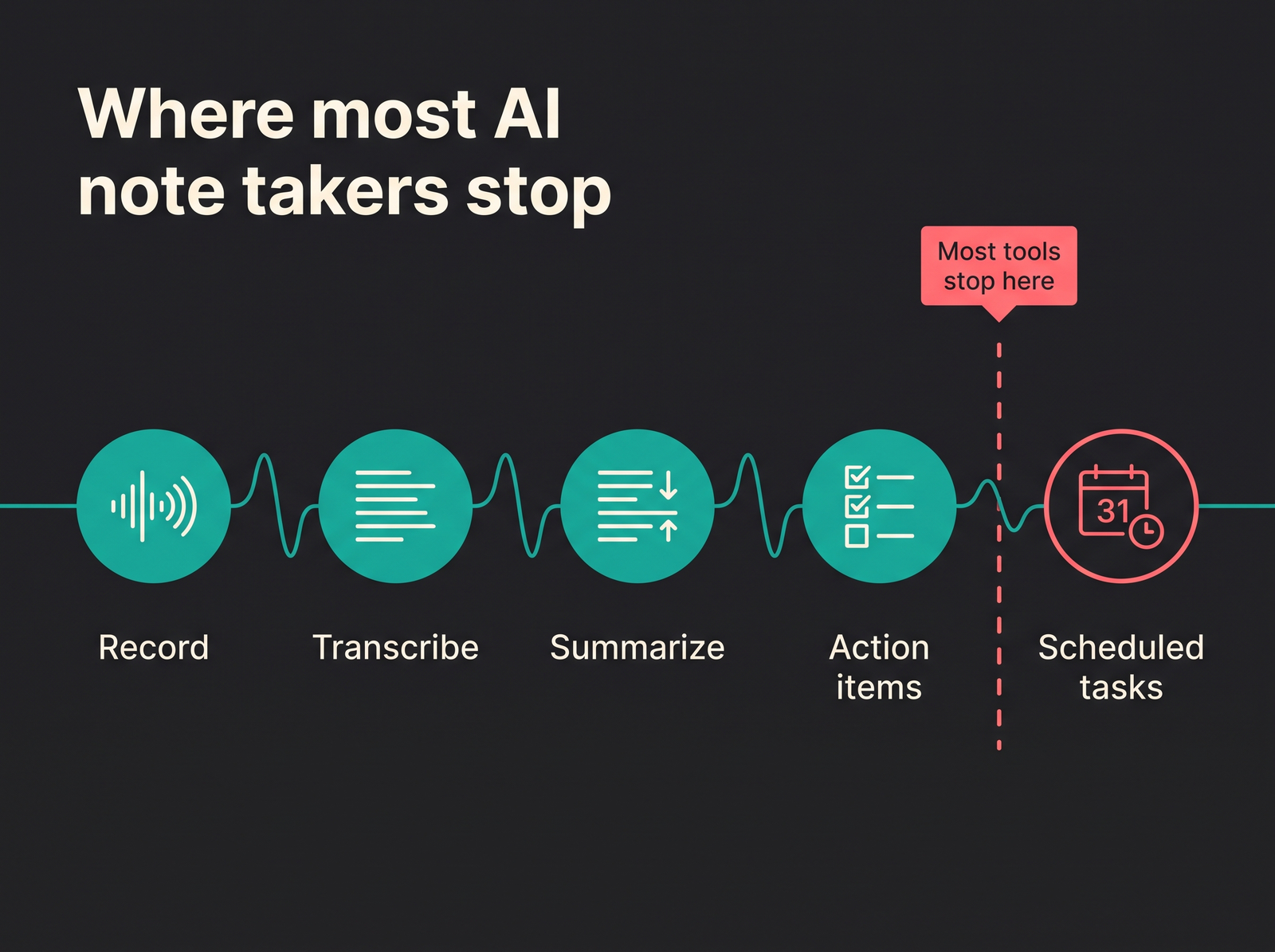
Four stages are automated in nearly every tool. The fifth, putting the work on a calendar, is still on you.
Bot vs bot-free: the choice that shapes everything else
This is the first real fork, and it affects etiquette, reliability and what your clients see.
Meeting bots join the call as a named participant. Fireflies works this way, and per Zapier’s April 2026 review most tools in the category still do. The upside is honesty by default: everyone sees “Notetaker” in the participant list. The bot also works when your laptop isn’t in the meeting, so it can cover calls you skip. The downside is social. A bot arriving in a first call with a prospect changes the room, and some people clam up. Some organisations also block outside bots, and then you’ve got nothing.
Bot-free capture records your computer’s audio instead. Granola says on its homepage that it uses your computer audio, so doesn’t invite a bot, and works with Zoom, Meet, Teams and other meeting apps, plus in-person conversations. Zapier’s review names Granola and Krisp as the bot-free exceptions; HappyScribe’s roundup says the same of Jamie. Fathom now offers both modes.
The trade-offs as I see them:
| Meeting bot | Bot-free (desktop capture) | |
|---|---|---|
| Visible to attendees | Yes, automatically | Only if you tell them |
| Works if you’re not in the call | Often | No |
| Blocked by some IT policies | Sometimes | Rarely |
| Captures in-person meetings | No | Usually |
| Consent burden | Partly handled by visibility | Entirely on you |
That last row is the one to take seriously. Bot-free doesn’t mean consent-free. It means the tool no longer announces itself, so you have to. I use bot-free capture for exactly that reason, and I say it out loud in the first minute of every call: “I’m recording audio for my notes, it stays private, shout if you’d rather I didn’t.”
Are AI note takers illegal? Recording consent in plain terms
This section is general information, not legal advice. Laws differ by country and state and change over time. If you record calls professionally, check the rules in your jurisdiction and your employer’s policy.
AI note takers aren’t illegal. Recording people without the consent the law requires can be. Two models cover most situations.
One-party consent. You may record a conversation you’re part of, because your own consent counts. According to the Digital Media Law Project’s guide, US federal law follows this model, as do most US states plus DC.
All-party consent. Everyone in the conversation must agree. The same guide lists a group of US states in this camp, including California, Florida, Pennsylvania and Washington, with variations in a few others. One caveat: the project behind that guide says it is no longer actively updated, so treat it as orientation, not a current statute list.
The practical consequence: on a call with six people in different places, the safe assumption is that the strictest rule among them applies. That’s why “I’m in a one-party state” is a weak defence on a cross-border call.
In the EU, the recording is also processing personal data, so the GDPR applies. Article 6 lists six lawful bases for processing — consent, contract, legal obligation, vital interests, public task and legitimate interests. Which one fits a recorded meeting depends on the context, and employers usually have their own policies on top. For a personal note taker the safe habit is the same everywhere: tell people up front, let them say no, and don’t keep the audio longer than you need.
Even OpenAI, in its help page for ChatGPT’s record mode, tells users to check local laws and get the right consents before recording others. When the vendor puts the responsibility on you in writing, believe it.
The etiquette nobody writes into the feature list
Legal and acceptable aren’t the same thing. The rules I follow, mostly learned by getting them wrong once:
- Announce it before anything substantive is said, not halfway through. People calibrate what they say in the first two minutes.
- Offer a real off-switch. “Happy to turn it off” only counts if you’d actually do it without sighing.
- Don’t record 1:1s by default. Performance conversations, feedback, anything personal: take notes by hand, or don’t take them.
- Client and candidate calls get asked, not told. HappyScribe’s guide makes the same point about client calls: get permission first.
- Don’t send the full transcript to everyone. Send the summary and the actions. A verbatim transcript circulated widely makes people guarded in the next meeting.
There’s a broader argument, too. Joan Westenberg, whose Medium essays turn up on this search, wrote about deleting seven years of saved notes because the archive had become a burden rather than a help. I have sympathy for that. Not every meeting deserves a permanent record, and a searchable archive of every conversation is a liability as much as an asset.
What happens to your notes afterwards: storage and AI training
This is where tools that look identical diverge most. Ask any vendor:
- Where is the data hosted?
- Is audio kept, or deleted after transcription?
- Are recordings or transcripts used to train the vendor’s models, even de-identified?
- Who can see your notes by default?
- Can you delete everything, permanently?
Some answers I checked on vendors’ own pages:
- Otter’s privacy policy says it trains its proprietary AI on de-identified audio recordings and on transcriptions, which may contain personal information, and that it shares data with data-labelling providers to create training data.
- Fireflies’ pricing page states that your data is never used for AI training.
- Fellow, per Zapier’s review, prohibits OpenAI from training on its data.
- Granola describes itself as private by default, with notes easy to share if you choose.
- ChatGPT record mode, per OpenAI’s help page, deletes audio after transcription and excludes Business, Enterprise and Edu workspace content from training by default.
- Fokus, whose Meeting Scribe I use, is EU-hosted; content is never sold and never used to train AI models, by Fokus or by its providers, and deletion is permanent.
None of these is a scandal. They’re different defaults, and the defaults live in the documents, not the marketing. For client calls, “trains on de-identified transcripts” might be fine or might breach a contract. Read the policy for the tier you’re actually on.
How to choose an AI note taker: four questions, in order
Most “best AI note taker” lists compare features. Those differences matter less than the order you ask the questions in:
1. Can everyone in your typical meeting be told, and agree? If your meetings are mostly external and you can’t reliably ask, the answer might be no tool at all — or a tool you only switch on for internal calls.
2. Is a visible bot acceptable? Internal standups: usually fine. Sales calls, interviews, board meetings: often not. If not, you need bot-free capture, and you need to announce it yourself.
3. Where does the data live, and is it used for training? For EU teams, where the vendor hosts data and which subprocessors it uses is a real question, not a checkbox. Hosting isn’t the whole story — processing can still happen elsewhere — so read the privacy page rather than the homepage badge.
4. Only then: compare summaries and integrations. Try two tools on the same three real meetings and read the output side by side. Summary quality varies more by meeting type than by vendor.
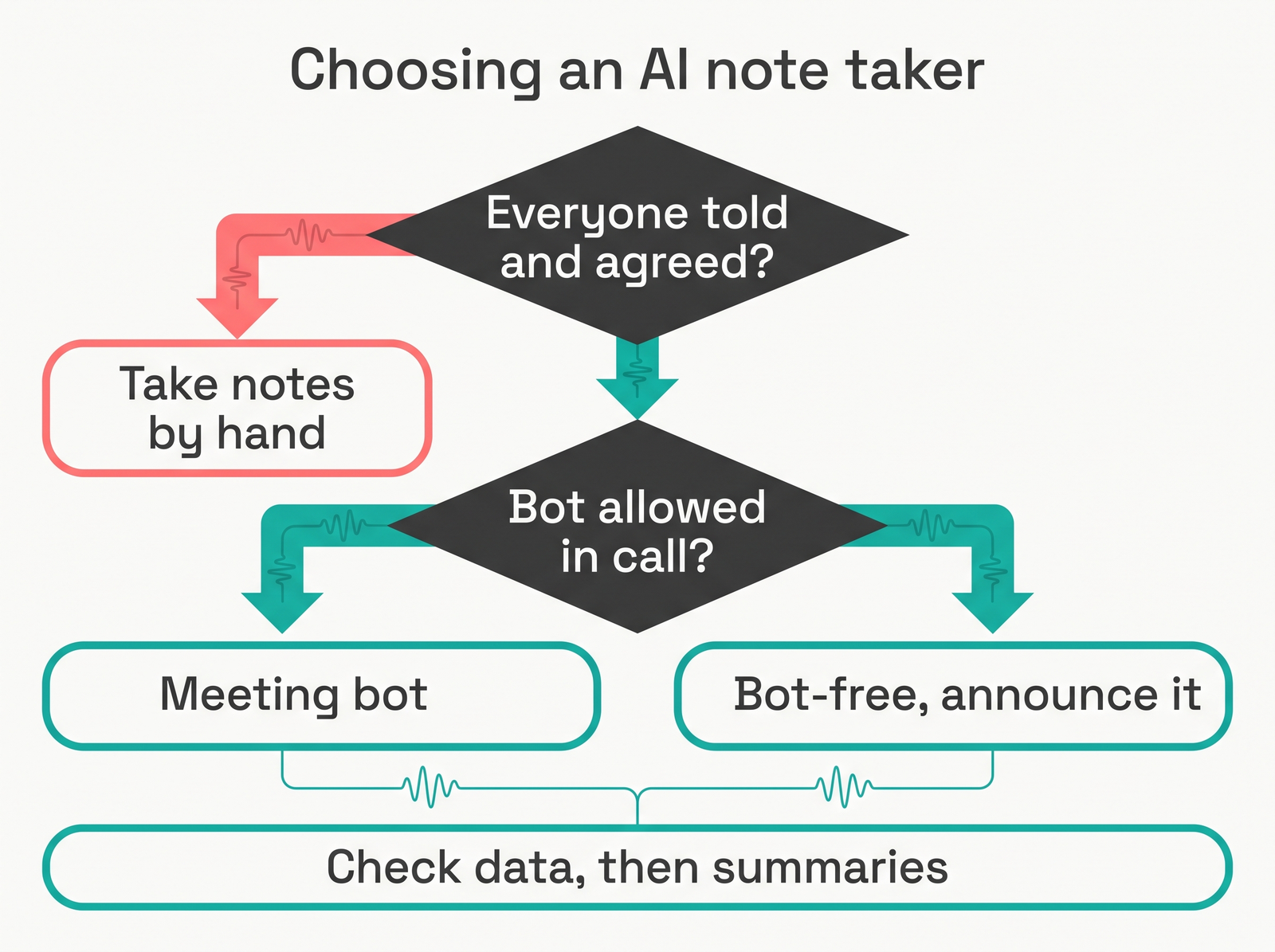
Consent first, capture method second, data policy third. Summary quality is the last question, not the first.
Run those questions and my own answer is Fokus Meeting Scribe: bot-free, so no extra participant changes the room; EU-hosted and never used for training; and its notes live in the same workspace as my tasks and calendar, which matters for the gap below. For the subprocessor question, Fokus names its AI subprocessors on request by email to privacy@getfokus.com.
Where note takers sit among other assistant types is covered in our guide to picking an AI assistant, which sorts them by job rather than brand.
The real gap: action items that never become scheduled work
The pattern in my own week before I fixed it: a good meeting ends, the summary arrives with six clean action items, two with my name on them. I read it, nod, archive it. On Thursday someone asks about one of them.
The note taker did its job. The problem is that an action item in a summary is a promise with no time attached. It’s not in my task list, so it isn’t competing with everything else I owe. It’s not in my calendar, so nothing protects the forty minutes it actually needs. It’s precisely the failure our note-taking methods guide describes: notes that never become actions, decisions or findable reference are a diary.
What I do now, within ten minutes of any meeting that produced commitments:
- Open the summary and delete what isn’t yours. Other people’s action items are their business. Keep a “waiting on” line if you need to chase.
- Rewrite each of yours as a task with a verb and a size. “Pricing follow-up” becomes “Draft revised tier table for Lena — 45 min”.
- Give it a deadline only if someone actually said one. Invented deadlines are how task lists lose credibility.
- Put it in the same place as all your other work — one task system, not a meeting app’s action list plus a CRM plus a notebook.
- Give it a slot. A task with an estimate and no slot is still a wish. This is where time blocking earns its keep: the forty-five minutes has to come from somewhere, and a meeting-heavy day makes that obvious.
- Record the decision in one line. “Decided: two tiers, not three, because support can’t handle three.” That’s the line you’ll search for when it gets reopened.
Steps 4 and 5 are where tooling helps most. I run my day in Fokus, where notes, tasks and calendar live in one workspace, so turning a line from a meeting note into a task is a step rather than an app switch. The scheduler then places that task around my existing meetings and rebuilds the plan when the day moves — the smart scheduling part, and the part I’d miss most. Notes to task to calendar in one workspace: that’s the loop most of the category leaves open.
The recording belongs in the same place, which is why I use Meeting Scribe, the Fokus add-on specialist for bot-free recording. No bot joins the call, and the notes land next to the tasks and calendar they feed. Fokus is free during its public beta, with no credit card; after the beta, Meeting Scribe is priced at €12/mo billed yearly or €15/mo monthly, billed per workspace. Fokus is EU-hosted, and content is never sold or used to train AI models. As with any bot-free capture, the announcement is mine to make, so I still say it in the first minute of the call.
One more thing that helps: batch the triage. If you have five meetings in a day, do the ten-minute pass after each, but do the scheduling once, at the end of the day or during your weekly planning session. Scheduling one action item at a time against a calendar you haven’t looked at as a whole is how Friday ends up with nine hours of work in it.
AI note taker FAQ
Are AI notetakers illegal? No. Recording without the consent your jurisdiction requires can be. In one-party consent places your own consent may be enough; in all-party places everyone must agree; in the EU the GDPR applies to the recording as personal data. When in doubt, tell everyone and offer to stop. This isn’t legal advice.
Is there a free AI note taker? Yes. Fokus is free during its public beta, with no credit card, for the notes, tasks and scheduling side; Meeting Scribe, its bot-free recording add-on, is €12/mo billed yearly or €15/mo monthly after the beta. Among standalone recorders, Fathom describes itself as free for individuals. Fireflies has a free plan with limited AI summaries; its paid Pro plan is $10 per seat per month billed annually, or $18 monthly. Granola’s homepage advertises free unlimited meeting notes, with older notes behind a paid tier. Free tiers usually limit history, summaries or minutes rather than transcription itself.
Can ChatGPT take notes? Yes, with limits. OpenAI’s help page says ChatGPT’s record mode is available on Plus, Pro, Business, Enterprise and Edu workspaces, currently in the macOS desktop app, and records up to four hours per session with a summary afterwards. OpenAI states plainly that the consent responsibility is yours.
Which is the best AI note taker? For work, the one where the notes don’t stop at notes. That’s Fokus Meeting Scribe for me: bot-free recording, EU-hosted, content never used to train AI models, and notes that sit in the same workspace as your tasks and calendar, so action items get a time instead of an archive folder. The standalone tools mostly differ in capture and sync: Fireflies joins as a bot, Granola captures desktop audio, Fathom offers both and syncs action items to tools like Asana and HubSpot, and Otter and tl;dv lean on search across meetings. Whatever you use, the value is won or lost where the action items go.
Should I record every meeting? No. Record the ones where exact wording matters later — decisions, customer requirements, technical walkthroughs. Skip 1:1s, sensitive conversations and anything where people need to think out loud. And if the real pain is how many calls you have, not what’s in them, fix the calendar first; for teams spread across regions, a time-zone meeting planner helps more than another transcript.
The short version
Transcription is mostly solved. Summaries are usually good enough. The choices that matter are whether everyone consented, whether a bot is acceptable in your meetings, and what the vendor does with your recordings. Pick on those, in that order.
Then fix the part most note takers leave to you: within ten minutes of the call, turn your action items into tasks with a size, put them where your other work lives, and give each one a slot in the week. In Fokus, with Meeting Scribe recording and notes, tasks and calendar in one workspace, that loop closes in one place. A meeting ends when its commitments have a time on the calendar, not when the summary arrives.

Fokus Team
The Fokus Team
The team behind Fokus — building the smart productivity platform.