Meeting Planner Time Zone Tools That Actually Work
Get the next article and product update in your inbox
Short product notes, fresh blog posts, and focus systems. No noisy sequence.

Nine of the top ten results for “meeting planner time zone” are tools, not articles. Most people don’t want a philosophy of distributed work; they want to know which box to type four cities into. So this piece does both — the tool comparison first, with real prices and ratings, then the part every one of those tools leaves out: what to do when the arithmetic comes back ugly.
I run a team split across San Francisco, London, Bangalore and Sydney. I have booked the 6 AM call. I have also been the person who booked it for someone else, twice in a row, without noticing. Everything below comes out of that.
The short answer: pick the tool by the job, then do the arithmetic
There is no single best meeting planner time zone tool, because four different jobs hide inside that search. Match the tool to the job:
- One-off “what time is it there?” — timeanddate.com’s World Clock Meeting Planner or a plain converter. Free, no signup, no account. Nothing paid beats it for a ten-second question.
- Visual overlap across 4–10 cities — our free Time Zone Overlap Finder, World Time Buddy, Every Time Zone, or Morgen’s free timezone meeting planner. You want the horizontal timeline that shows working hours as coloured bands.
- Letting an external person book you — a scheduling link that auto-detects the visitor’s zone: OnceHub, Koalendar, or your calendar’s native booking page. The zone problem disappears because the invitee never converts anything.
- Finding a slot for eight people who don’t share a calendar — a poll: Doodle or Rallly. Participants mark availability in their own zone and the tool reconciles it.
Then, before you accept whatever the tool highlights, run the overlap arithmetic yourself once. It takes ninety seconds and it changes the meeting more often than the tool does.
Meeting planner time zone tools compared (real pricing, real ratings)
Prices and ratings below are the ones published by the tools and aggregators at the time of writing; verify before you buy anything, because tiers move.
| Tool | Best for | Price | Rating |
|---|---|---|---|
| Fokus Time Zone Overlap Finder (ours) | Shared overlap band across up to six cities, nothing to sign up for | Free | — |
| timeanddate.com Meeting Planner | Fast one-off checks, many zones | Free | — |
| World Time Buddy | Visual multi-city slider | Free; pro adds scheduling | 4.5/5 (Google Play) |
| Morgen timezone meeting planner | Colour-banded overlap + IANA/DST accuracy | Free tool | — |
| Koalendar meeting time zone planner | Overlap plus a booking page | Free tier | 4.9/5 (808 reviews) |
| Every Time Zone | Clean horizontal timeline | Free; pro $39/yr for 3 users | — |
| OnceHub | External booking, team scheduling | Free tier, then $10/seat/mo | 4.7/5 (Capterra) |
| Clockwise | AI that moves meetings to protect focus | Free for individuals; $6.75/user/mo teams | 4.7/5 (G2, Capterra) |
| Doodle | Group polls across zones | Free; premium from $6.95/user/mo annual | — |
| Rallly | Open, lightweight polling | Free; paid $56/yr | 4.4/5 (Capterra, TrustPilot) |
| Google Calendar (native) | Simple recurring meetings you already own | Included | 4.8/5 (GetApp, Software Advice) |
| Pizzatime | Social/team-building sessions | Paid | 2.9/5 Trustpilot, 3.8/5 Product Hunt |
Four notes the listicles skip.
The top row is ours, and it is free. We built the Time Zone Overlap Finder because we kept doing the arithmetic in the next section by hand. Add up to six cities, drag the working-hours window, and the green band is the stretch of day where every city sits inside it — and when there is no full overlap it names the best partial (“four of six”) instead of showing you an empty row, which is the answer you actually need. Offsets resolve live from your browser’s IANA database, so DST is handled rather than remembered, and the link you copy carries the cities, the hours and the picked slot with it — paste a working URL into the thread instead of a screenshot. The limitation to know up front: one working-hours window applies to every city, so if Bangalore starts at 10 and London at 8, the band is an approximation. Per-person hours and a calendar that reshuffles around the call are the Fokus app itself, further down.
Morgen deserves credit, and they’re a competitor. Morgen builds a planner we compete with, and their free tool is the implementation I’d point an engineer at: it uses real IANA time zone data including DST changes, and it bands the timeline yellow for ideal, orange for acceptable, red for outside business hours — the correct model, because “available” and “reasonable” are not the same thing. What their page doesn’t tell you is how those working hours are computed (preset 9–5 or customisable?), whether it does live conflict detection against your calendar, how many zones it handles, or how it behaves on mobile. Test that before it becomes team infrastructure.
Your native calendar is better than its reputation for the simple case. Google Calendar lets you set a time zone per event and auto-adjusts for invitees; it rates 4.8/5 on GetApp and Software Advice for a reason. In Outlook, turn on the second time zone in Calendar options and set the event’s zone on the event itself. Two zones and one recurring slot? You already have the tool.
Polls solve a different problem than planners. A planner answers “when do our hours overlap.” A poll answers “which candidate slots can these specific humans make.” Coordinating eight people across four companies, the poll wins; setting a standing team call, the planner wins and the poll just adds a round trip.
The overlap arithmetic to run before you open any tool
Every planner is a calculator. Do the sum once by hand and you’ll stop being surprised by what it returns.
Convert each person’s working window to UTC, then intersect the ranges. For my four cities in August:
- San Francisco 09:00–17:00 PDT = 16:00–24:00 UTC
- London 09:00–17:00 BST = 08:00–16:00 UTC
- Bangalore 09:00–17:00 IST = 03:30–11:30 UTC
- Sydney 09:00–17:00 AEST = 23:00–07:00 UTC
Now intersect:
- London ∩ Bangalore = 08:00–11:30 UTC. Three and a half hours. Comfortable.
- SF ∩ Sydney = 23:00–24:00 UTC. Exactly one hour: 4 PM in San Francisco, 9 AM the next day in Sydney.
- SF ∩ London = zero. Their windows touch at 16:00 UTC and don’t overlap at all.
- All four at 9–5 = zero. There is no hour of the day when those four cities are all inside standard business hours.
That last line is the number that matters, and most tools won’t say it out loud — they show you an empty row and leave you to draw the conclusion. It means an all-hands for that group is not a scheduling problem. It’s a design problem.
When the overlap is zero or one hour, you have four real options, in order of how much I like them: widen the window deliberately (SF 08:00–18:00 and London 08:00–18:00 gives you 15:00–17:00 UTC — two hours, which is SF 8–10 AM against London 4–6 PM); split the meeting into two regional sessions with a shared written brief; make it async; or cancel it. “Everyone takes a bad hour forever” is not on the list.
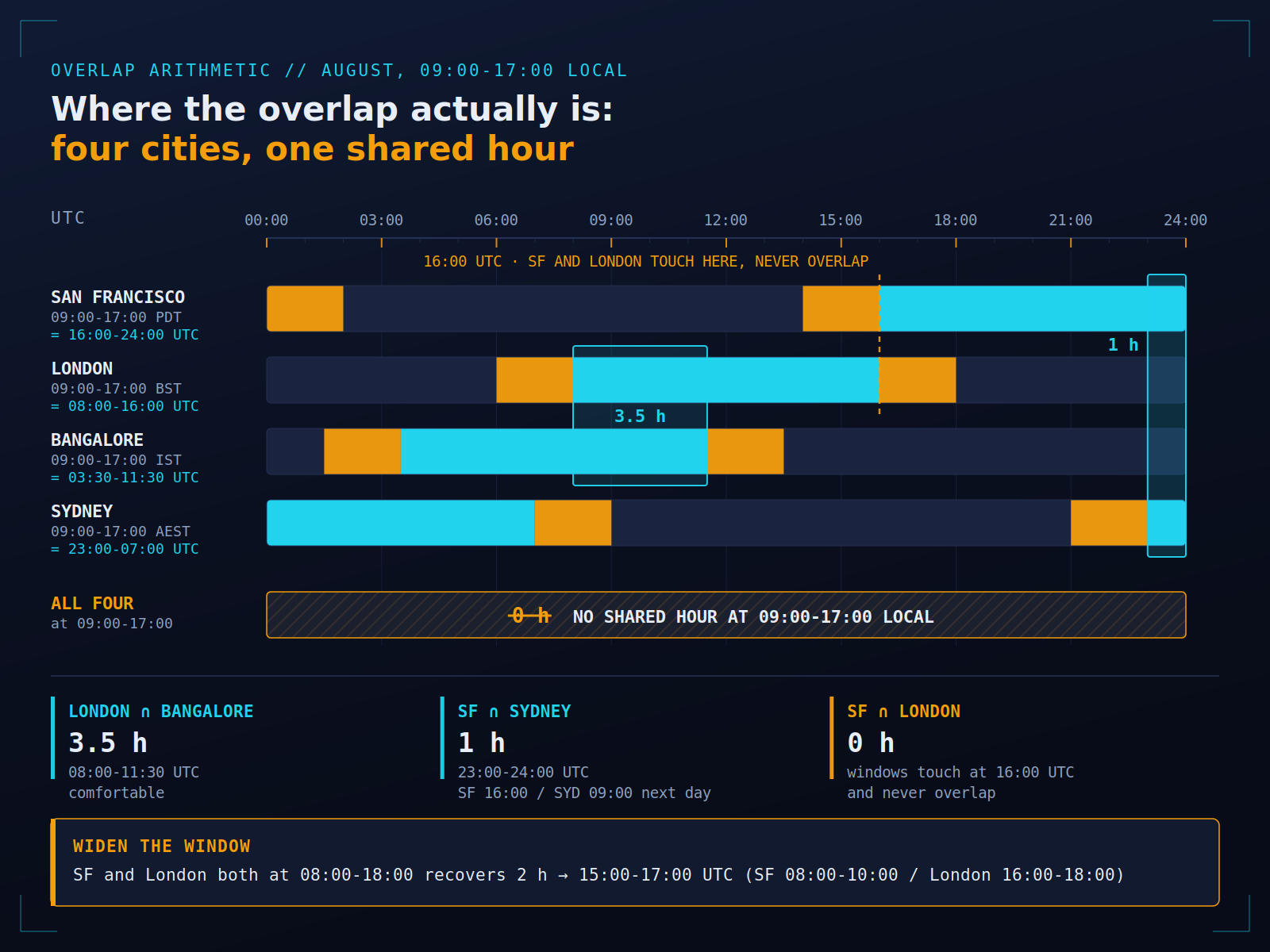
Four cities on 09:00-17:00 local leaves zero shared hours. Widening two of them by an hour recovers most of it.
DST is the real failure mode, not the arithmetic
The biggest review of these tools in the SERP lists DST as a selection criterion and then never evaluates it for a single one of the nine tools it covers. That’s the gap, because the arithmetic almost never breaks — the calendar does.
Three regions change clocks on three different schedules:
- US: second Sunday in March, first Sunday in November.
- EU/UK: last Sunday in March, last Sunday in October.
- Australia (NSW): first Sunday in October, first Sunday in April.
So for roughly three weeks each March, New York and London are four hours apart instead of five — the US has sprung forward and Europe hasn’t. There’s a shorter mismatch of about a week in late October, running the other way. San Francisco to Sydney swings between 17 and 19 hours over the year, with transition windows at 18. And India (UTC+5:30), Japan, most of Africa and Arizona never change at all, so a London–Bangalore call moves twice a year purely from London’s side.
That’s three to four weeks a year when the offset you carry in your head is simply wrong. The failure looks like this: someone sets a recurring meeting to a fixed UTC offset — “16:00 UTC every Tuesday” — and in March the London attendees quietly start arriving an hour late relative to their own working day.
The fix is one rule: store the meeting as zone plus local time, not as an offset. “Europe/London 15:00” is stable across DST. “UTC+1” is a snapshot that expires. Any tool built on the IANA time zone database does this correctly — Morgen says explicitly that it uses IANA data including DST changes, and native Google Calendar and Outlook events do too, provided you set a zone on the event rather than trusting your own converted number. Anything that asks you to type “GMT+5” is a red flag.
One more habit: schedule the meeting from the zone with the most attendees or the most constrained working day, and let the rest float. It puts the DST movement where the fewest people feel it.
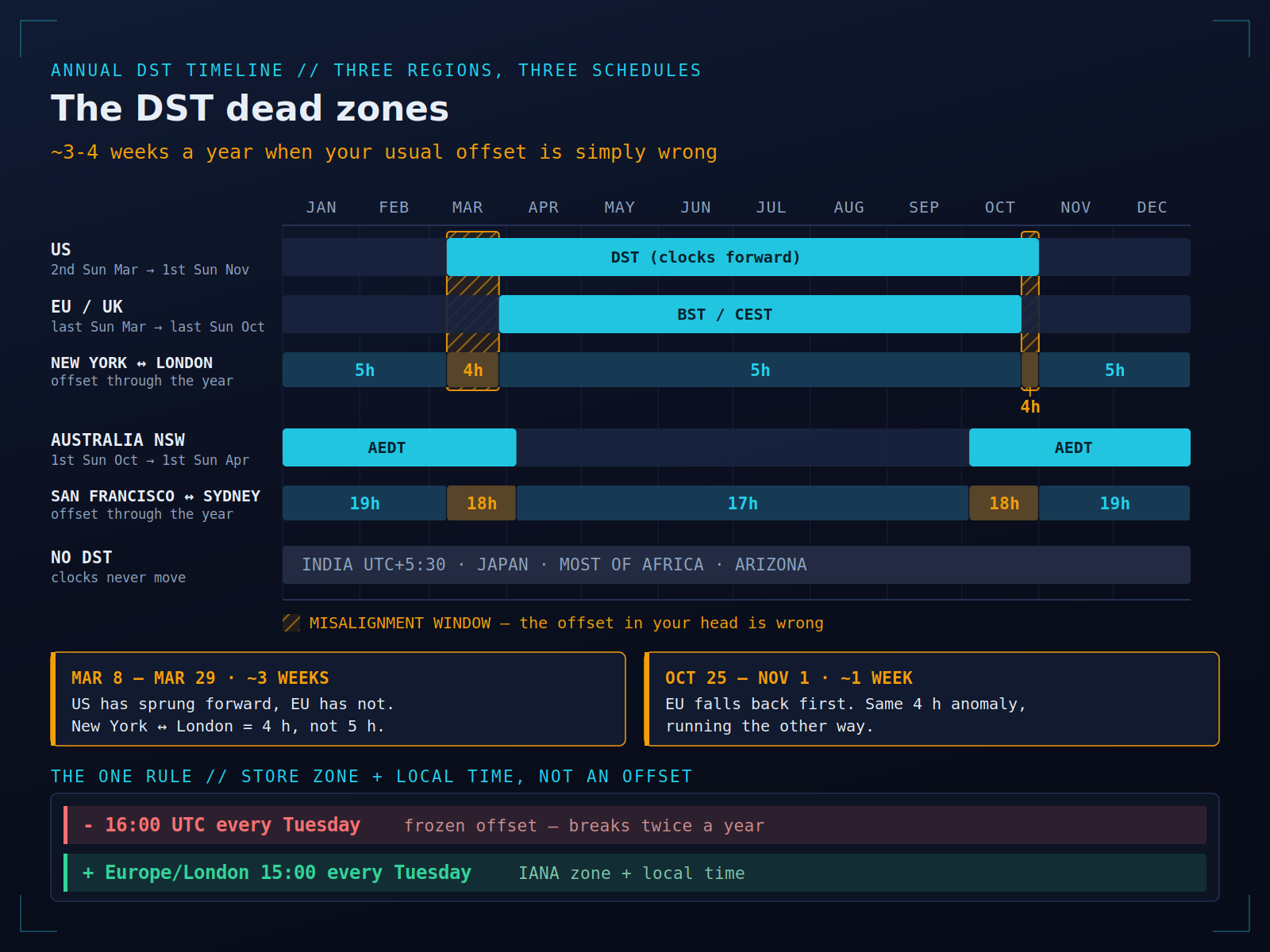
For about a month a year the offset in your head is simply wrong. Store a zone and a local time, never a fixed offset.
Feasibility vs sustainability: which meetings earn a bad hour
Every tool I’ve listed optimises feasibility. A 7 AM London slot is feasible. It’s also a slot someone attends in their kitchen before their kids are up, and if it’s weekly they will start skipping it by month three.
The question I ask now is not “can everyone make it” but “is this meeting worth someone’s worst hour.” My rule of thumb:
- Earns a bad hour: a live decision with real disagreement; an incident; a first conversation with a customer or candidate; a quarterly planning session where the whole point is the room.
- Doesn’t: status, demos, most reviews, FYI updates, anything with a deck that would read fine on its own.
There’s a second cost the tools can’t see. A slot can be inside someone’s working hours and still be expensive — if it lands in the middle of the two-hour block where they do their hardest thinking, you didn’t save an hour, you spent three. This is where I lean on scheduling that knows about energy, not just availability: Fokus’s smart schedule places work against my peak hours, so when a cross-zone call has to land, it lands against admin time and my deep work block survives. If your working hours in these planners are set to a generic 9–5 you never actually work, every tool downstream inherits the lie — blocking your real focus windows first makes the overlap honest.
Rotate the pain: a fairness rule for recurring meetings
None of the tools track who keeps eating the bad hour, so someone has to. Three rules that have held up for me:
- Rotate recurring calls on a fixed cadence. Our fortnightly cross-region sync alternates between an SF-friendly slot and a Sydney-friendly one. Each region takes the early morning half the time. Announce the rotation up front so nobody has to negotiate it individually.
- Cap unsociable slots per person per month. Mine is two. When someone hits the cap, the next meeting moves, splits, or goes async. A cap makes the trade-off visible instead of letting it accumulate on whoever complains least.
- Put an expiry date on any recurring meeting held outside someone’s working day. Six weeks, then it must be re-justified. Most don’t survive the review, which is the point.
I run these checks during weekly planning — it takes two minutes to scan the week for slots outside someone’s day. If you’re the person consistently on the wrong end of the overlap, the countermeasure is a stated boundary, not stoicism; the work-life balance side of this is a real cost, and unstated boundaries get overwritten by whoever books first.
Async-by-default triage: the meetings that shouldn’t be meetings
When your overlap is one hour a day, that hour is the scarcest resource the team has. Spending it on a status update is malpractice.
The triage I use before booking anything across zones:
- Decision with genuine disagreement → sync, and spend the overlap.
- Decision where the options are clear → written proposal, 24-hour comment window, default to the proposal if nobody objects.
- Status, metrics, progress → async, always. A written update in a channel, with the numbers.
- Review or feedback → async first, with a 15-minute sync only if the comments deadlock.
- Relationship, onboarding, conflict → sync, and give it a good hour, not a leftover one.
Async has a cost: it turns a 20-minute conversation into a 40-minute document. It pays back when the alternative is a permanent 6 AM. It doesn’t for a fast-moving decision among three stakeholders in adjacent zones — that’s a call.
How I actually run a cross-zone week
The whole workflow, honestly:
- Working hours per person are recorded once — real ones, not aspirational 9–5.
- New meeting request arrives. Triage it: sync or async? Most go async.
- If sync, open a free planner (our overlap finder, Morgen’s or World Time Buddy) with the actual cities, look at the banded overlap, and pick from the green.
- Check the fairness ledger — has this region taken the bad slot recently?
- Create the event with an explicit IANA time zone, never a converted number.
- For external people, send a booking link so their browser handles the conversion.
- In Fokus, the meeting lands on the calendar and my remaining work reshuffles around it, so a 7 AM call doesn’t silently eat the morning I’d planned to think in.
Total tool spend for this: zero, unless you want booking pages or AI rescheduling. The free planners are genuinely good. The expensive part was never the software.
Quick answers
Is there a good free meeting planner time zone tool? Yes — our Time Zone Overlap Finder, timeanddate.com, World Time Buddy, Every Time Zone and Morgen’s free planner all cover overlap visualisation. Paid tiers buy booking pages, polls and automated rescheduling, not better time-zone maths.
Do these tools handle DST? The good ones do, because they use IANA data. Your risk isn’t the tool — it’s a recurring event stored as a fixed offset, or a human doing the conversion from memory.
Outlook or Google Calendar without a third-party tool? Set the event’s time zone explicitly on the event, enable the second time zone in your calendar view, and let invitees see it in their own zone. For two zones and a standing call, that’s the whole solution.
Poll or planner? Planner for standing internal meetings, poll for one-off multi-company scheduling.
What if there’s no overlap? Then it isn’t a meeting. Split it by region, write it down, or drop it.

Fokus Team
The Fokus Team
The team behind Fokus — building the smart productivity platform.