Goal Tracking App: How to Pick One You Won't Abandon
Get the next article and product update in your inbox
Short product notes, fresh blog posts, and focus systems. No noisy sequence.

The short answer: which goal tracking app for which goal
The best goal tracking app depends less on features than on the type of goal you’re tracking, and on whether the app connects that goal to the time you actually have. Here’s the version I’d give a friend: my pick is Fokus, because it gives every goal type a slot in the week instead of a ring in another tab.
- Habit goals (meditate daily, three runs a week): the habit sits under a week-level objective, and its sessions become tasks that get auto-scheduled around your meetings.
- Target goals (a number by a date, like 500 km run or €10k saved): split the number across quarter, month and week objectives, so 500 km becomes roughly 10 km this week, which is a number you can actually plan.
- Project goals (ship a portfolio site, finish a course): the Objective Decomposition agent proposes the steps, and the steps become tasks that land in real free time on your calendar.
- Milestone goals and long horizons (a career move this year): a yearly objective with quarterly and monthly objectives underneath, so the horizon is broken down before the week starts.
Then one test decides whether you’ll still be using it in March: does the goal reach your calendar? If the app can’t turn “finish the course” into two blocks next Tuesday and Thursday, you’ll need a second system that does, and the gap between those two systems is where most goals quietly die.
Dedicated goal apps like Strides, Habitica, Griply, Timestripe and TickTick each cover part of this; I describe what each one does further down. I’ve run yearly and quarterly goals through most of them over the past few years. Every setup I abandoned failed the same way, and it wasn’t the app’s feature list.
Why most goal tracking apps get abandoned
Goalsandprogress.com, the page Google’s AI overview leans on for this query, cites a 2024 scoping review in the Journal of Medical Internet Research: across the studies it covers, a median of 70% of users abandoned lifestyle and mental health apps within the first 100 days. The same page, and habi.app’s roundup, also point to a meta-analysis showing that monitoring progress does raise goal attainment, more so when you check often.
Put those two findings side by side and you get the whole problem. Tracking works. People stop tracking. So the useful question isn’t “which app tracks best”, it’s “why do people stop opening it?”
My answer, from four abandoned setups: the goal lived in a separate app from the calendar where my time was actually decided.
Monday morning goes like this. You open your calendar. It already holds nine meetings, two deadlines and a request from your manager. You plan the week there, because that’s where the hours are. The goal app sits in another tab, with a lovely progress ring at 34%, and nothing in it has a claim on Tuesday. Goal work is important and never urgent, which means it loses every scheduling fight it wasn’t entered into in advance.
After three weeks, the ring stops moving. After six, opening the app feels like reading a list of broken promises, so you stop. The app didn’t fail at tracking. It failed at placement.
There are two smaller failure modes worth naming:
- Too many goals. Goalsandprogress recommends capping active goals at three, which matches my experience. Twelve goals in an app is a wishlist with charts.
- Tracking theatre. Logging becomes the activity. I covered this in detail in the habit tracker guide: the streak gets protected, the behaviour it measured doesn’t.
Four goal types, one place to plan them
None of the three pages I read closely for this piece (habi.app’s five picks, reclaim.ai’s fourteen, goalsandprogress.com’s roundup) separates goal types, and that’s why their lists feel interchangeable. Reclaim’s list puts time trackers like aTracker and ClockDiary next to goal apps, which tells you how loose the category is.
Strides, oddly, is the clearest teacher here, because its own site splits tracking into four shapes: habits you log yes or no, a target value by a date, an average over a time period, and projects with milestones, percentages and checklists. Borrowing that logic, I sort goals like this:
| Goal type | What “progress” means | Example | What the app must do |
|---|---|---|---|
| Habit | Repetition over time | Write 30 minutes a day | Remind, log fast, forgive a miss |
| Target | A number moving toward a number | Run 500 km this year | Accept any value, show pace against a date |
| Project | Steps getting done | Launch a newsletter | Hold tasks, order them, schedule them |
| Milestone | Checkpoints on a long horizon | Move into a product role by Q4 | Break the horizon into quarters and months |
The mistakes follow directly. People put a milestone goal (“get promoted”) into a habit tracker and end up logging “worked on promotion: yes” every day, which measures nothing. Or they put a habit into a project tool and create 365 tasks. If you’re building habits specifically, habit stacking will do more for you than any app choice; the app just records it.
Most real goals are a mix. “Publish 12 essays this year” is a milestone goal at the top (one a month), a project in the middle (outline, draft, edit, publish) and a habit at the bottom (drafting blocks twice a week). An app that handles only one layer handles only a third of the goal. In Fokus the three layers are one stack: a yearly objective, monthly objectives under it, and tasks that get scheduled into the week.
The apps, tested against the same question
I checked each app’s own site this week rather than trusting the listicles. I’ve left out prices, because they change more often than these pages get updated. Most of them have a free way in.
Strides. A dedicated tracker. Four tracker types, a pace line on targets and projects, flexible reminders on habits, and progress shown as bars, streaks, success rates, calendars and line charts. Where it stops: it tracks progress, but it doesn’t plan the work. Griply’s own comparison makes the same point: Strides’ goal metrics don’t connect to daily tasks.
Habitica. Your real life as a role-playing game. The wiki lists four task types: Habits (good or bad), Dailies, To-Do’s and Rewards you set yourself, plus parties with friends and quests where you fight monsters together. The party is the social hook: missing your Dailies hurts your teammates. It’s weaker on long horizons. Griply’s FAQ notes it lacks deadline-based goal metrics and progress charts, and I’d agree that a milestone goal doesn’t map naturally onto hit points.
Griply. A goal app built around a hierarchy. Its site describes a chain of Vision, Life Areas, Goals, Subgoals, Projects, then Tasks and Habits, and its site pitches planning your week around your goals, with time blocking and calendar integrations. The free plan, per Griply’s own FAQ, covers two goals, two habits and unlimited tasks.
Timestripe. Built around horizons. Its App Store listing describes planning “daily, weekly, monthly, yearly and lifetime goals”, linking goals between boards and a calendar, and importing events from your device’s Calendar and Reminders. The horizon view is its answer to “how does this year connect to this week?” I couldn’t get its own website to load for this piece, so I’m relying on the store listing; check the current version yourself.
TickTick. Not a goal app, and its site doesn’t claim to be one. It’s a strong task manager with a habit tracker, calendar views from yearly down to daily, calendar subscriptions, a Pomodoro timer and an Eisenhower matrix. Habi.app notes the calendar view needs the premium plan. Griply’s FAQ says TickTick has “no architecture connecting habits to goals”: you can build the connection yourself with lists and tags, but nothing enforces it.
Notion. Every roundup includes it, and habi.app is right that nothing else lets you redesign the whole data model. It’s also a blank page: build a goal system there only if you enjoy building systems.
Here is how they score on the three-link chain the next section explains: goal, weekly work, scheduled time. I’ve added Fokus, the planner I use, as the last row.
| App | Holds the goal | Breaks it into weekly work | Puts it on the calendar |
|---|---|---|---|
| Strides | Yes, with pace lines | Partly (milestones, checklists) | No |
| Habitica | Loosely | Via Dailies and To-Do’s | No |
| Griply | Yes, deep hierarchy | Yes (subgoals, projects, tasks) | Weekly planning with time blocking |
| Timestripe | Yes, across horizons | Yes (horizon boards) | Links goals to a calendar view |
| TickTick | Not natively | Yes (tasks) | Calendar views; you place the tasks |
| Fokus | Yes, objectives at week, month, quarter and year | Yes (Objective Decomposition agent proposes the pieces) | Yes, tasks auto-scheduled around your meetings |
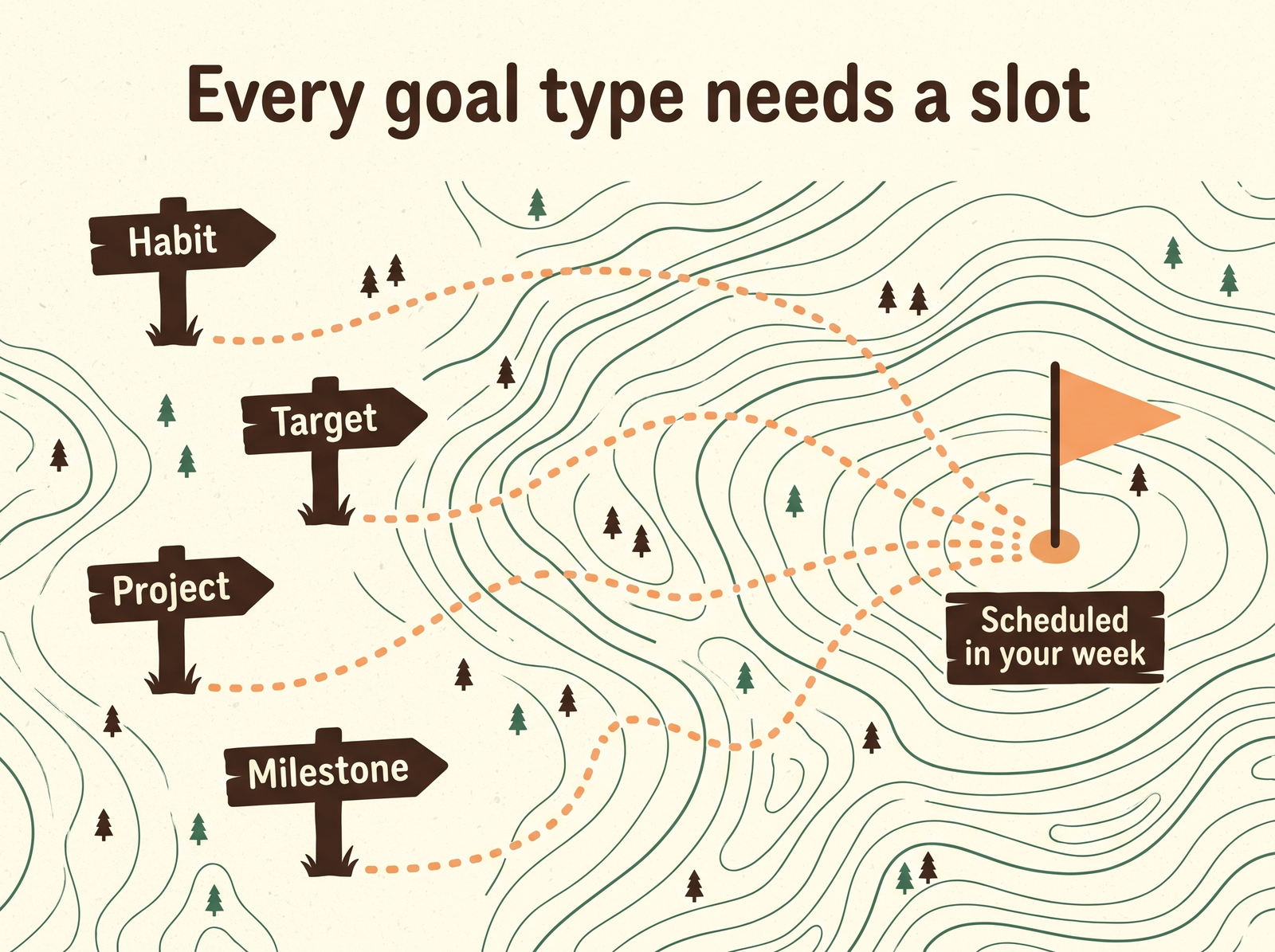
Habit, target, project or milestone: every trail has to end in the same place, a slot in your week.
The test that matters: goal to week to calendar
A goal survives a year only if something forces it into each ordinary week. That requires three links, and most apps provide one or two:
- Goal → weekly work. The yearly goal gets sliced into something you can finish in five working days. Not “progress on the essay project” but “draft essay four” or “outline and first 800 words”.
- Weekly work → scheduled time. That slice gets real blocks on the calendar before the week fills with everyone else’s requests. This is the link the goal apps skip, and it’s the one I explained at length in the SMART goals guide: goal work only wins fights that were decided in advance.
- Scheduled time → back to the goal. When the block happens or doesn’t, the goal’s progress reflects it without you re-entering anything.
Take the goal “publish 12 essays this year” all the way down:
- Year (the summit): 12 essays published.
- Quarter: 3 essays shipped.
- Month: one essay done, start to finish.
- Week: two drafting blocks of 90 minutes, plus one editing block.
- Today: the 90-minute draft block from 8:30 to 10:00, before the first meeting.
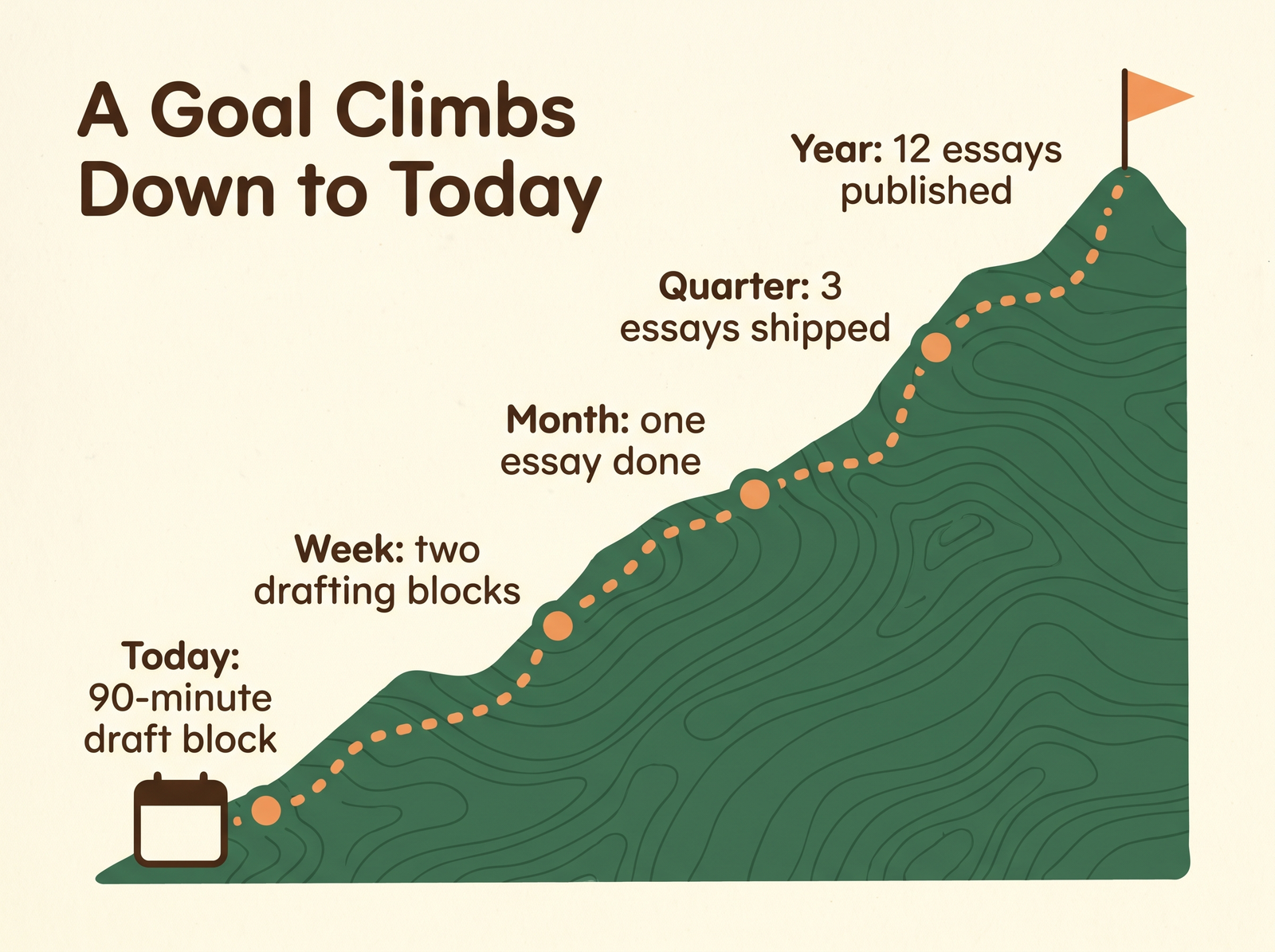
The summit is the yearly goal. The only part of the climb you can actually walk is today’s block.
Only the last line is something you can do. Everything above it is a promise. A goal tracking app that stores the top line beautifully and has no opinion about the bottom one is a very good way to feel organised about something you’re not doing.
The fix is to stop keeping the goal and the calendar in separate places. If you’ve already abandoned two goal apps, look for a planner where the objective, the week’s tasks and the calendar are one workspace and the scheduling happens for you. That’s how I run mine, in Fokus, and the section below shows how.
How to keep track of daily goals without another app
This is a People Also Ask question, and the honest answer is that daily goals shouldn’t be tracked as goals at all. A daily goal is either a habit (log it) or a block of scheduled work (do it). A tracker adds nothing to either.
What I do instead takes about a minute a day and ten minutes a week:
- Weekly: in my weekly planning session, each active goal gets its slice for the week and a specific block. No block, no slice; if I can’t find the time, the goal is paused on purpose, not neglected by accident.
- Daily: the block is on the calendar, so the day’s plan already contains the goal. If the block moved, I move it, rather than deleting it. Time blocking does the heavy lifting here. In Fokus, the Morning Briefing walks me through the day’s plan, gives it a score for the quality of the planning and surfaces the important things, which is my one-minute daily check.
- Friday: did the slice ship? Two misses in a row means the goal needs surgery, whether that’s a smaller slice, a later date, or an honest kill.
That rhythm is the “progress monitoring” the research rewards. It’s frequent, it’s cheap, and it happens in the place you already plan.
What I use: goal, week and calendar in one place
I run my goals in Fokus, which is the planner I use for everything else, and that’s exactly why: the goal and the calendar are the same workspace. Objectives sit at year, quarter, month and week level, so the essay goal above exists as one yearly objective with quarterly and monthly ones under it.
Two parts of it do the work the goal apps skip. The Objective Decomposition agent proposes how to break an objective into smaller pieces, and I adjust the proposal to fit my week. And the tasks under an objective get auto-scheduled into my calendar around meetings, so the drafting block lands in real free time. If it gets bumped, it rolls over rather than vanishing. And each morning the Morning Briefing walks me through planning the day, scores the plan for the quality of the planning and surfaces the important things, so the goal block is part of the day before the first meeting is. Fokus is free during its public beta, no credit card.
Here is how each goal type looks in it:
- Habit: a week-level objective, with its sessions as tasks that get auto-scheduled around meetings.
- Target: the number split across quarter, month and week objectives, so this week’s share is what you plan and check.
- Project: the Objective Decomposition agent proposes the steps; the steps become tasks that land in the calendar.
- Milestone: a yearly objective with quarterly and monthly objectives underneath.
The rule I run on: only one tool owns your calendar, and the goal has to live in that tool. That’s the whole reason my goals are in Fokus.
Goal tracking app FAQ
What is the best goal tracking app? My pick is Fokus, because it carries every goal type from objective to scheduled time: objectives at week, month, quarter and year level, the Objective Decomposition agent for the breakdown, and tasks auto-scheduled into your calendar. Dedicated apps like Strides, Habitica, Griply, Timestripe and TickTick each cover part of that chain. Whatever you look at, check that it connects the goal to scheduled time.
Which is the best free tracking app? Fokus is free during its public beta, no credit card. Among the dedicated goal apps, Griply’s free plan covers two goals, two habits and unlimited tasks (per its own FAQ), and Habitica’s core game is free.
What is the best goal planner? A goal planner is different from a goal tracker: it decides when the work happens. If that’s what you need, look for a tool where goals and calendar share a workspace and the scheduling happens for you, rather than a pure tracker. That’s what Fokus is built around: objectives, tasks and calendar in one place, plus a morning planning ritual that scores the day’s plan.
What is the No. 1 productivity app? My answer is Fokus, because it covers capture, prioritisation and scheduling in one workspace, and scheduling was my bottleneck. There’s a broader tour in the best productivity apps of 2026. My own rule is the same one this article runs on: the app that wins is the one that reduces the number of places you plan.
Should habits and goals live in the same app? Ideally, yes: in the tool that owns your calendar. Habits that need a time slot (a weekly long run, a writing session) should get scheduled there, while habits that fit around life (drink water) don’t need a slot at all.

Fokus Team
The Fokus Team
The team behind Fokus — building the smart productivity platform.