Retrospectives: Formats That Work, Actions That Stick
Get the next article and product update in your inbox
Short product notes, fresh blog posts, and focus systems. No noisy sequence.

A retrospective is a short, recurring meeting where a team looks back at a finished stretch of work — a sprint, a project phase, a month — and decides what to change before the next one. The standard shape has five stages: set the stage, gather data, generate insights, decide what to do, close. That’s the definition every page on Google gives you, and it’s correct.
Here’s the part that decides whether the meeting was worth it, and it fits in four lines:
- How long: 30–60 minutes for a two-week sprint. The Scrum Guide caps it at three hours for a one-month sprint and says shorter sprints get shorter retros.
- How often: at the end of every iteration. If you don’t work in sprints, every two weeks or once a month.
- What it produces: one or two changes. Not a whiteboard of twenty sticky notes — one or two actions, each with a single named owner and a booked time slot.
- How you know it worked: the next retro opens by checking those actions before anyone writes a new sticky note.
That last line is the one almost nobody runs. I’ve facilitated retros for engineering and product teams for years, and I run a solo version on myself every Friday. The failure I see most isn’t a bad format or a quiet team. It’s action items that look great at 4pm on Thursday and are dead by Tuesday, because nobody owned them and nothing on anyone’s calendar said when they’d happen.
Why most retrospectives change nothing
Adobe’s guide lists “poor follow-through” as one of three barriers to a good retrospective, next to low engagement and lack of trust. I’d put it first by a distance. Engagement and trust problems are visible in the room. Follow-through fails silently, a week later, when nobody’s looking.
The pattern is always the same:
- The team produces eight to twelve action items, because every good point deserves one.
- Ownership is written as “team” or not written at all.
- The actions go into a doc, a Confluence page or a Miro board — somewhere nobody opens between retros.
- Sprint work fills the calendar by Monday. Improvement work has no slot, so it loses every time.
- Two weeks later, the same complaint comes up. Someone says “didn’t we talk about this?” and the team quietly loses faith in the ritual.
Step five is the real cost. A retro that never changes anything teaches people that saying true things out loud is pointless — which is exactly the opposite of what the meeting is for.
Adobe also cites research claiming teams that run retros show 24% higher responsiveness and 42% greater quality. It doesn’t name the study, so I wouldn’t lean on the numbers. The mechanism is plausible, though, and it only works if the changes happen.
The fix: fewer actions, one owner, one slot, one check
Atlassian’s advice is to discuss improvements for the top two problem areas and create an action plan with clear owners and due dates. That’s most of the answer. I’d tighten it into four rules:
1. Two actions, maximum. If the team can’t agree on which two matter most, dot-vote. A third action isn’t extra progress; it’s a tax on the first two.
2. One owner per action, by name. “The team will improve code review” is a wish. “Priya will draft a review checklist and post it in the channel” is an action. The owner doesn’t have to do all the work — they have to make sure it happens. Same logic as the single A in a RACI chart: two owners produce mutual deference, not double effort.
3. A booked slot, before the meeting ends. Not a due date — a slot. The owner opens their calendar in the room and blocks the 45 minutes they’ll spend on it this week. A due date says when it’s late. A slot says when it gets done. If you already time-block your week, this is one more block.
4. The next retro opens by checking them. First five minutes, every time: done, in progress, or dropped — and if dropped, why. Dropping an action on purpose is fine. Forgetting it is the thing we’re fixing.
The Scrum Guide says the most impactful improvements “may even be added to the Sprint Backlog”. I’d drop the “may”. If it’s not in the backlog or on someone’s calendar, it’s competing with delivery work with no slot of its own, and it will lose.
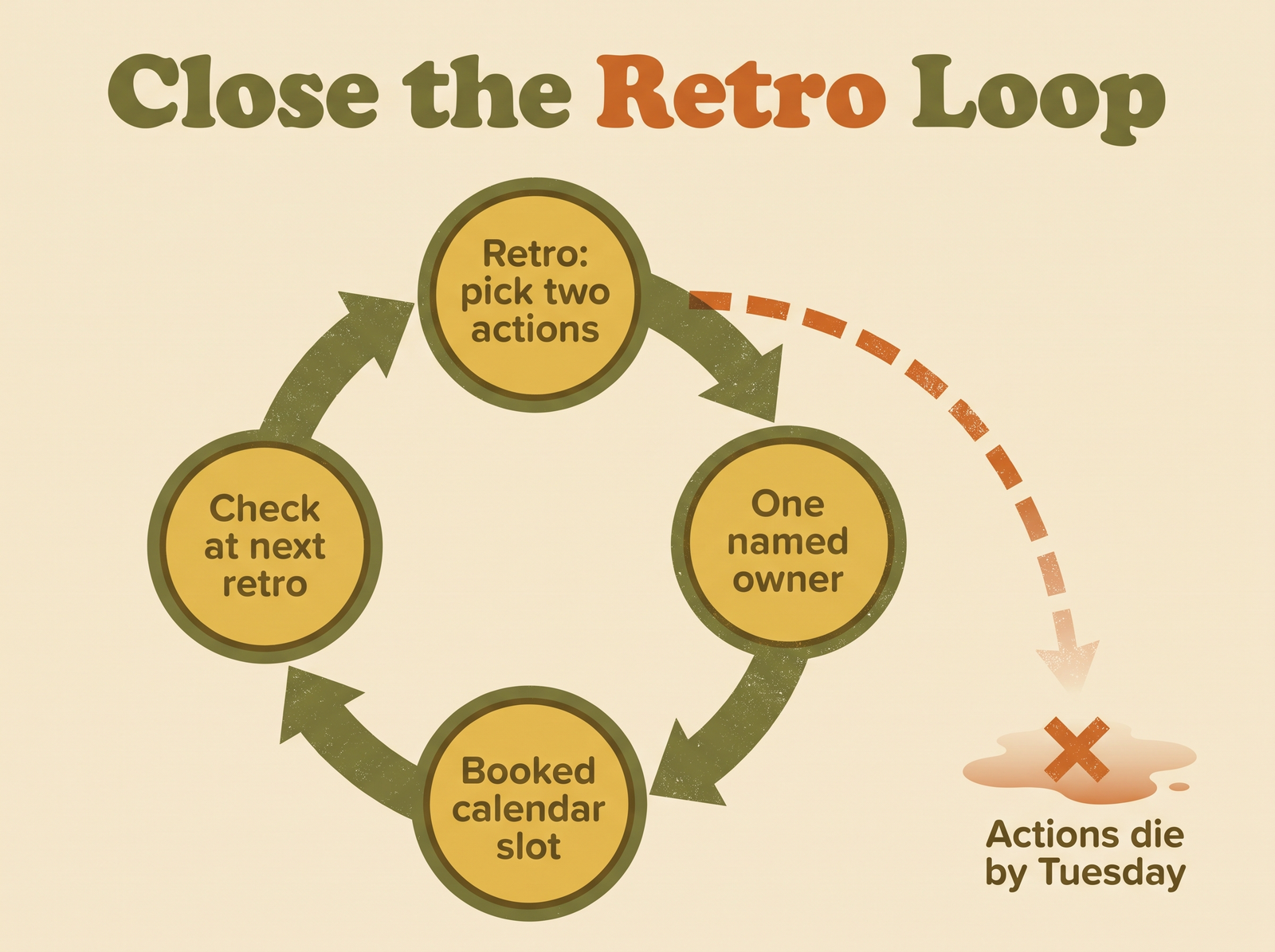
The loop only closes if every action gets a name and a time. Skip the slot and the action leaks out before Tuesday.
Retrospective formats that work, and when to use each
Formats matter less than follow-through, but a fresh format does help a team that’s gone stale. Adobe lists eight — 4Ls, sailboat, dot voting, start/stop/continue, question cards, affinity mapping, PMI and six hats. Atlassian adds more/less and glad/sad/mad. These are the five I actually rotate through:
| Format | The prompts | Use it when | Watch out for |
|---|---|---|---|
| Start / Stop / Continue | What should we start, stop, keep doing? | New teams, first retros, anyone short on time | ”Stop” gets skipped because it feels like blame |
| 4Ls | Liked, Learned, Lacked, Longed for | After a project or a longer stretch | ”Longed for” turns into a wishlist — cap it |
| Sailboat | Wind, anchors, rocks, island | Teams that have lost sight of the goal | Takes 10 minutes longer; needs a real goal to point at |
| Glad / Sad / Mad | What made you glad, sad, mad? | After a rough sprint, when mood is the real data | Needs trust; don’t run it with a new manager in the room |
| More / Less | What do we want more of, less of? | Mature teams tuning an already-decent process | Too gentle for teams with real problems |
Start/stop/continue is the default for a reason: it’s hard to misunderstand, and Coursera and Atlassian both lead with it. Its weakness is that “stop” asks someone to name a colleague’s habit in public. I get around this by making “stop” about processes only — “stop starting code review on Friday afternoons”, not “stop being late to review”.
4Ls works best after something that took longer than a sprint, because “learned” needs time to mean anything.
Sailboat is my favourite for a team that’s busy but drifting. The island forces the question most retros skip: where were we actually trying to go? If nobody can answer that, you’ve found your action.
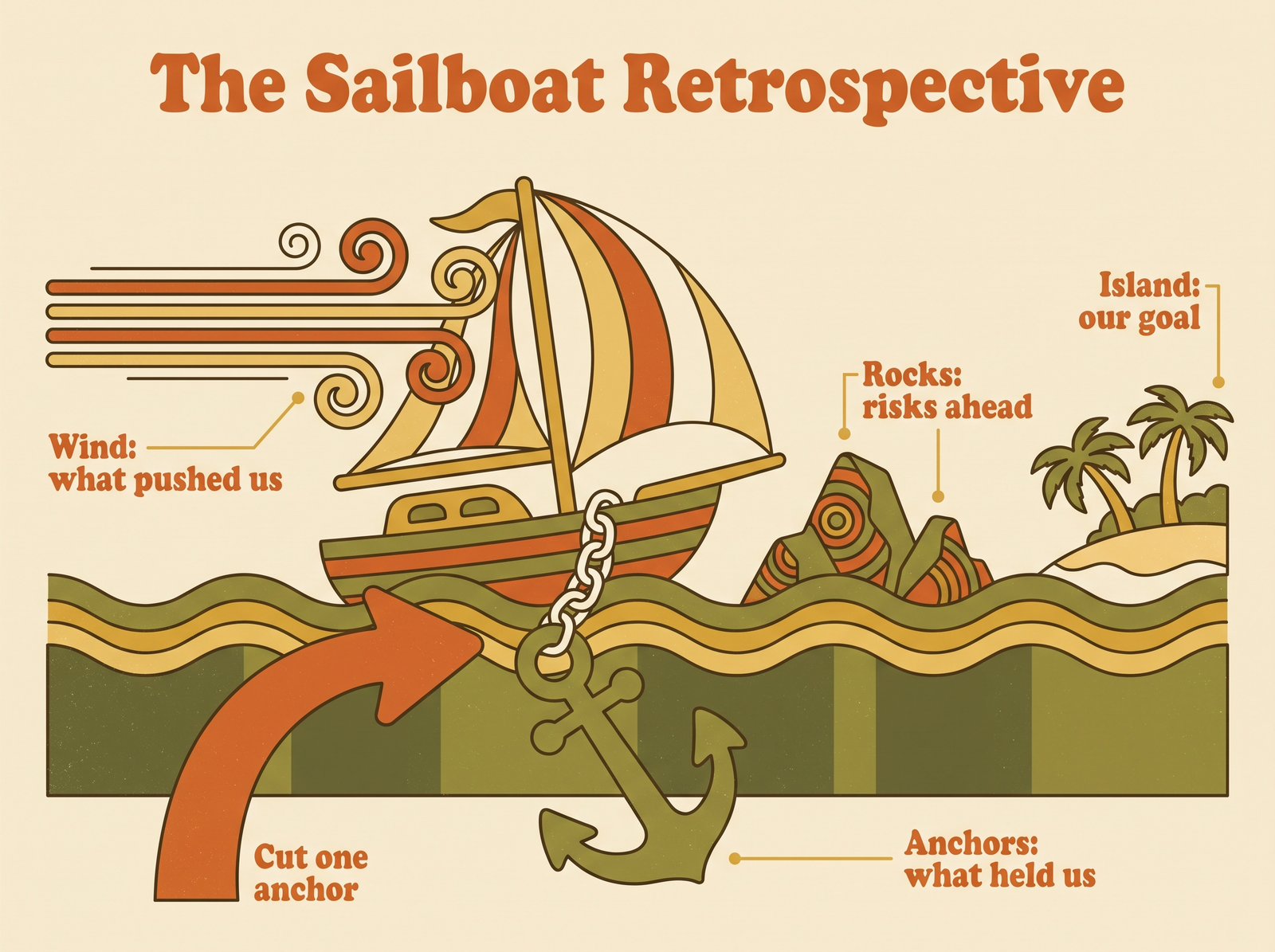
Wind, anchors, rocks, island. The action almost always comes from cutting one anchor, not from adding more wind.
How do you run the sailboat in practice? Draw the boat, give everyone five minutes of silent writing per area, cluster, then ask one question: which single anchor, if we cut it, would move us fastest toward the island? That’s your first action. The rocks give you a second candidate if one is urgent.
A 30-minute team retrospective agenda
Coursera suggests 45 minutes to three hours depending on complexity; Atlassian says 30 minutes to an hour. For a two-week sprint and a team of five to eight, I run 30 minutes and it’s enough — as long as nobody treats the last ten minutes as optional.
| Minutes | Stage | What happens |
|---|---|---|
| 0–5 | Close the last loop | Check last retro’s actions: done, in progress, dropped. No new topics yet. |
| 5–8 | Set the stage | State the sprint goal. One-word check-in round. Remind everyone the point is the system, not the person. |
| 8–15 | Gather data | Silent writing in the chosen format. Silence matters — it stops the loudest person from setting the agenda. |
| 15–22 | Generate insights | Cluster the notes, dot-vote, discuss the top two clusters only. |
| 22–28 | Decide | Two actions. Name an owner for each. Owners book their slot now, in the meeting. |
| 28–30 | Close | Read the two actions aloud. One line from each person on whether the retro was worth their time. |
Three notes from running this many times:
- The first five minutes are non-negotiable. Skip them once and the loop is broken. The Scrum Guide has the team inspect how the last sprint went, and last sprint’s improvements are part of that.
- Rotate the facilitator. Atlassian suggests the Scrum Master, the product owner, or a rotating role. Rotating works better than you’d think: people who’ve facilitated once become much better participants.
- Remote teams need a board, not a doc. Silent writing and dot-voting want a shared visual surface, and any whiteboard the team already uses will carry the conversation. Just don’t let the actions stay there: the board is where the retro is discussed, not where it’s decided whether it worked.
Many facilitators open by reading Norm Kerth’s Retrospective Prime Directive, which asks everyone to assume that people did the best they could with what they knew at the time. It sounds corny once. It changes the tone of the next hour more reliably than anything else I’ve tried.
The 15-minute solo retrospective for knowledge workers
Retrospectives aren’t only for Scrum teams. A solo retro is the same idea pointed at your own week, and for most knowledge workers it’s the highest-return fifteen minutes on the calendar.
It’s not the same as weekly planning. Planning looks forward: what goes where next week. The retro looks back and asks why last week went the way it did. I run the retro first, then plan — the retro’s one change becomes an input to the plan.
Friday, 15 minutes:
- Check last week’s change (2 min). Did I actually do the one thing I committed to? If not, was it the slot, the scope, or did I not really want it?
- Pick a format (1 min). Start/stop/continue works well solo. For a hard week, glad/sad/mad is more honest.
- Write, don’t think (6 min). Three to five lines per prompt. Look at your actual calendar and task list, not your memory of the week — memory flatters.
- Find the pattern (3 min). What showed up twice? A meeting that always overruns, a type of task you keep rolling over, an afternoon slot where nothing gets done.
- One change, one slot (3 min). Exactly one. Put it on next week’s calendar before you close the laptop.
One change a week sounds tiny. Fifty changes a year is not. And unlike a team retro, nobody else will hold you to it, so the slot matters even more.
The solo retro has a side effect I didn’t expect: it’s an early warning system. When the same “stop” item shows up three weeks in a row — too many meetings, work drifting into the evening, the deep-work block that never survives — that’s worth taking seriously. I wrote about those countable warning signs in the signs of job burnout your calendar shows first.
Where my retro actions actually live
I’ve tried keeping retro actions in a doc, a notes app and a dedicated retro board. They all fail the same way: the action lives somewhere I don’t look during the week.
What works for me now is treating every retro action as an ordinary task with a date. I run my week in Fokus (free during its public beta, no credit card), which auto-schedules tasks into real calendar slots around my meetings, so the action shows up in my day like anything else. If it slips, it rolls over to the next day rather than disappearing — which means it’s still visibly there when Friday’s retro comes round to check on it.
The daily version matters too. Fokus has an End-of-Day Review ritual, and I use it as a two-minute micro-retro: what happened, what moved, what didn’t. By Friday I’m not reconstructing the week from memory. The next morning’s Morning Briefing is the other half: it walks me through the day, surfaces what matters and scores the plan, so the day starts from what’s planned, not from my inbox.
For bigger, slower changes — “stop taking meetings before 10” — I attach the retro action to a weekly objective, so it’s tied to something I’ve said matters instead of floating free. The point is that the action lands where your week already happens, in a task system that ends in a calendar, and in Fokus that’s simply where tasks live.
The live conversation can happen on any whiteboard. The part that decides whether the retro worked — two owned actions, each with a scheduled slot, still visible when the next retro checks them — lives in Fokus.
Retrospective questions, answered briefly
What is the meaning of retrospective? Literally, looking back. In work, it’s a structured meeting where a team reviews a finished stretch of work to decide what to change. Coursera distinguishes it from introspection: a retro examines events and actions, not inner feelings.
What are retrospectives in project management? A recurring review held during a project, not only at the end. Adobe makes this distinction: unlike a post-mortem, a retro happens while work continues, so the team can adapt before the project is over.
What is a retrospective example? A team finishes a two-week sprint. In start/stop/continue they write “start: pairing on risky changes”, “stop: merging on Friday afternoons”, “continue: the Tuesday demo”. They vote, pick “stop Friday merges”, and the tech lead owns it with a 30-minute slot to update the release checklist on Monday.
Why do we do retrospectives? Because processes drift and nobody notices until something breaks. A retro is a scheduled moment to notice. Done well, it’s also where a team learns that raising problems leads to change.
What are the five stages of a retrospective? Set the stage, gather data, generate insights, decide what to do, close. I’d add a zeroth: check the last retro’s actions.
How long should retrospectives be? 30 minutes for a two-week sprint with a small team; up to an hour for larger teams or after hard sprints. The Scrum Guide’s ceiling is three hours for a one-month sprint. A solo weekly retro takes 15.
The short version
A retrospective is only as good as what changes afterwards. Pick any sensible format — start/stop/continue to begin, sailboat when the team has lost the plot — and keep it to 30 minutes. Leave with at most two actions. Give each one owner and a booked slot before anyone leaves the room. Open the next retro by checking them.
Run the same loop on yourself every Friday in 15 minutes, with one change instead of two. The meetings don’t need to be better. They need to finish.

Fokus Team
The Fokus Team
The team behind Fokus — building the smart productivity platform.