Apps for ADHD at Work: What Actually Sticks
Get the next article and product update in your inbox
Short product notes, fresh blog posts, and focus systems. No noisy sequence.

A note before anything else: this is a tools-and-workflows guide, not medical advice. Nothing here diagnoses anything, and no app in it is a substitute for an ADHD assessment or for treatment — clinicians and patient organisations are the right source for those questions. This piece covers something narrower: which software actually holds up in a working week, and why so much of it gets deleted a month after install.
The short answer: choose for the break point, not the feature list
Most articles on apps for ADHD hand you names with a line each. That’s easy to write and nearly useless, because the problem is almost never that you haven’t heard of Todoist. It’s that the setup you built in March is dead by April.
So start from where your day actually breaks, and pick one tool for that break point:
- The task is too big to start. Task splitting. Goblin Tools’ Magic ToDo takes “prepare Q3 review” and returns a list of small, actual steps.
- Time disappears. Something that makes time visible — a day laid out proportionally, so an hour looks like an hour. Tiimo turns a brain dump into a visual timeline; Llama Life runs timeboxed lists with chimes at set intervals; Focus Keeper is a plain Pomodoro timer with ambient sound; any planner with a real timeline day view does the same job without adding a surface.
- You can’t start alone. Body doubling — working alongside someone else, on camera, for a fixed session. Focusmate is the standard one.
- You wrote it down and still missed it. Persistent reminders. Due repeats an alert until you complete or reschedule it. Remember The Milk pushes the same reminder through several channels, including email and text.
- You lose hours to the browser. Friction. Freedom blocks sites on a schedule; RescueTime rates your activity from Very Distracting to Very Productive so you find out where the time went.
- One bad day kills the whole plan. A plan that rebuilds itself rather than one you re-type by hand.
Then apply five selection criteria, in this order:
- Setup takes under thirty minutes. A tool that needs a weekend of configuration is asking for exactly the thing that’s hardest to summon. ADDA names this failure mode explicitly and names Notion as the example.
- It runs on every device you actually use. Due is iOS-only. That’s fine if you’re all-Apple and disqualifying if you’re not.
- Its notifications persist. More on this below — it’s the single most important design decision.
- It survives a bad week. Can the setup absorb three days of chaos without needing a manual rebuild?
- It adds a surface only if it removes a problem. Every new app is another place to check.
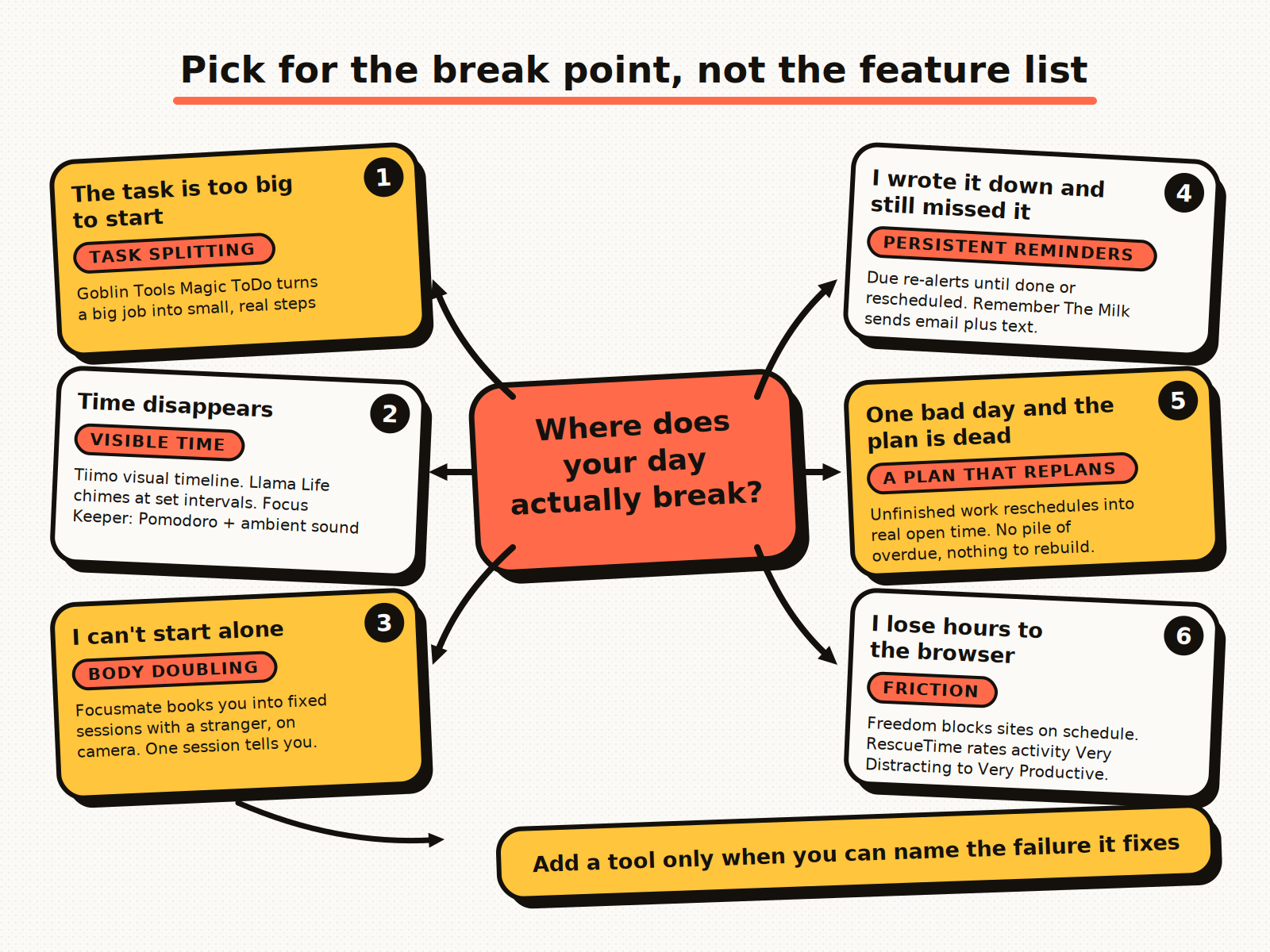
Pick the tool for the break point you can actually name. Everything else is shopping.
Why most setups die around week three
Everyone hints at this and nobody writes it down. ADDA says “the most effective ADHD tool is the one you’ll actually use consistently.” ADDitude’s writer, who has ADHD himself, says apps can “help level the playing field — if used consistently.” Both stop exactly where the interesting part starts: why consistency fails on a predictable schedule.
Here’s the pattern I’ve watched play out dozens of times, in my own systems and in the setups of people I work with:
Day 1. Novelty is doing all the work. You import everything, tag everything, colour-code everything. The system has never been more accurate than it is right now.
Day 8. Still going, slightly out of date, patched as you go. This is the part everyone remembers fondly, and it’s why people recommend apps that later failed them.
Day 21. The first genuinely bad week has happened — a crisis at work, illness, travel, a deadline that ate three days. You didn’t open the app for four days. Now the plan inside it is fiction: overdue items you already did, a schedule for a week that never happened, thirty red badges.
And here’s the actual killer: reconciling a stale plan costs more energy than building a new one, and far more than abandoning it. So it gets abandoned. Not out of laziness, and not because the app lacked a feature — because the recovery cost exceeded the restart cost. Two months later a new app looks appealing, precisely because it starts empty.
Anything that reduces recovery cost is worth more than any clever feature:
- Fewer places to reconcile. One surface to fix beats four.
- Automatic re-planning. If unfinished work re-schedules itself into real open time instead of piling up as overdue, there is nothing to rebuild. This is the one thing I’d optimise for above all others, and it’s why auto-scheduling is the feature I care about in my own planner.
- A cheap weekly reset. Fifteen minutes, same slot every week, where the only job is to make the plan true again. A weekly planning routine does more for durability than any app choice.
- A system that looks fine when you’ve ignored it. If opening the app on Monday is punishing, you won’t open it on Tuesday.
Take the Reddit answer seriously: calendar, timer, reminders
The most-upvoted comment in the r/adhdwomen thread on this exact question says: “Apps make it worse other than Calendar, timer, and reminders.” Google quotes it in its AI overview and then recommends six apps anyway.
That comment is right more often than the app industry admits. Calendar, timer and reminders are already installed, free, synced everywhere, and require zero configuration — and your colleagues can see your calendar, which makes it the one system other people cooperate with.
So the honest recommendation is: start there and only add a tool when you can name the failure it fixes. Concretely, the boring stack looks like this:
- Everything with a time goes on the calendar as a block, not on a list. A list is a wish; a block is a decision about when. (The mechanics are in our time blocking guide.)
- Anything you must not forget becomes a reminder with an alert, not a note.
- All focused work runs against a visible timer — the Pomodoro method is fine, and so is any timer you can see from across the desk.
If that holds for a month, you may not need anything else. If it breaks in a nameable way — “I can never start the big ones”, “I lose the whole afternoon” — buy exactly one tool for that break.
The integration tax: four tools is a job, not a system
Here’s what the listicles never cost out. Follow the standard advice and you end up with a capture app, a timer, a calendar and a task manager. Four tools, each individually good. What you’ve actually built is:
- Four surfaces to check every morning.
- Four places the same task can hide.
- Four notification sources competing for the same attention.
- A daily reconciliation job — usually ten to fifteen minutes — that exists only because the tools don’t know about each other.
That reconciliation is executive-function work: you’ve spent planning capacity to buy planning capacity. And it’s fragile — the moment one surface goes stale you stop trusting all of them, which returns us to week three.
This is why I’d take a mediocre two-tool setup over an excellent four-tool one nearly every time. Fewer tools usually beats better tools. The practical rule: capture, calendar and today’s plan should be the same surface, and everything else is optional. That’s also the argument for connecting your existing calendars and task sources into one place rather than adding a fifth app.
Notification design is the feature that matters most
Two apps with identical features can have opposite outcomes based on one behaviour: what happens when an alert fires and you don’t act on it.
Dismissible notifications assume you’ll remember later. They fire once, you’re mid-sentence in a meeting, you swipe it away, and the information is now gone from the system entirely.
Persistent-until-done notifications assume you won’t. Due keeps re-alerting until the task is completed or explicitly rescheduled. It is mildly annoying by design, and that is the point.
Snooze sits between the two and is the quiet system-killer. It feels responsible — you’re deferring, not dismissing — but a snoozed item leaves no trace except in a timer you can snooze again. Three snoozes later it’s gone, and nothing records that it existed.
Settings that survive a real workday:
- Persistent alerts for commitments to other people and hard deadlines only. Everything persistent is expensive; spend it deliberately.
- Redundant channels for the small handful of things that truly cannot slip — Remember The Milk’s email-plus-text approach is the model here. Two channels for five items, not one channel for fifty.
- Silence everything else during focus blocks. Notification volume is why people stop reading notifications; the fix is fewer, not smarter. (More on defending the block in how to stop distractions.)
- If you catch yourself snoozing the same item three times, that’s not a reminder problem. The task is either badly defined or you’ve decided not to do it. Split it or delete it.
What a four-app stack actually costs per year
Nobody publishes this number. ADDA notes ADHD apps run roughly $5 to $50+ per year and lists subscription cost as a reason people abandon them; ADDitude’s 25-app roundup contains no cost analysis at all. Add up a realistic stack and the annual bands look like this:
| Layer | Typical annual cost |
|---|---|
| Task manager / capture (paid tier) | ~$30–60 |
| Focus or body-doubling app | ~$40–120 |
| Visual timer / timeboxing app | ~$30–70 |
| Blocker or activity tracker | ~$40–100 |
| Four-app stack | ~$200–400 |
Two things to notice. First, the feature you actually needed — recurring reminders, calendar sync, the timeline view — is almost always on the paid tier; the free version is a demo of the thing that would have helped. Second, a lot of that $200–400 goes to apps abandoned in month two and never cancelled. Check your subscriptions; the graveyard is usually bigger than you think.
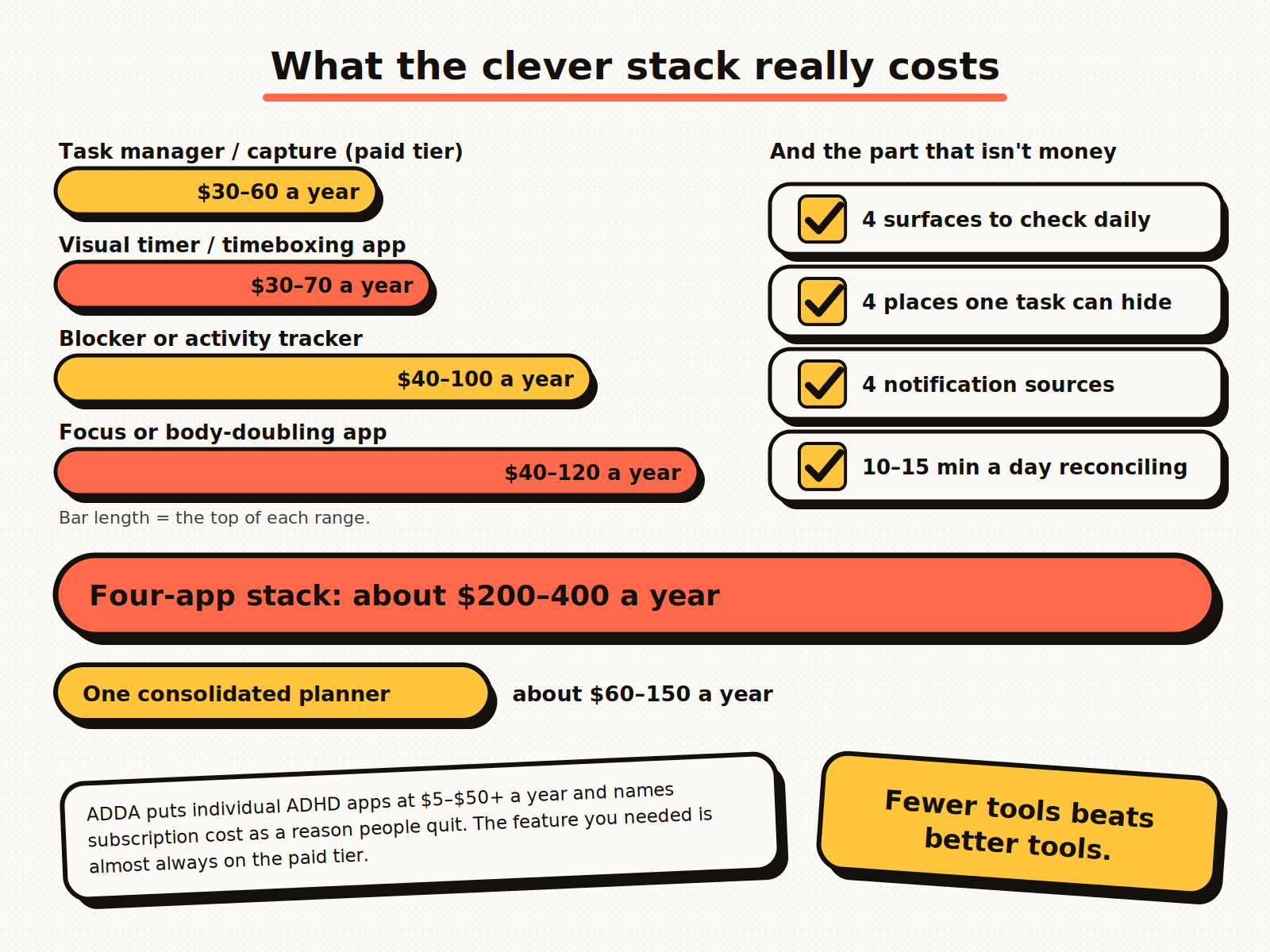
The subscription total is the visible cost. Four places for one task to hide is the expensive one.
A work setup that survives a year
Almost every guide on this topic is written for life admin — chores, bills, laundry, students. Almost none is written for an adult with a job, a full meeting calendar and colleagues waiting on replies. Here’s what I’d run:
One inbox. Every commitment lands in one place, whether it arrives by email, Slack or someone stopping you in a corridor. Not three lists. The discipline is in our task management guide; the tool matters less than the singularity.
One plan for today, on a calendar. Meetings and work occupy the same surface, so the plan can’t quietly overcommit. If the day has four hours of meetings, you can see that you have three hours of work, not eight.
A daily cap, not a list. The 1-3-5 rule is the usual version: one big thing, three medium, five small. It isn’t an ADHD technique, just a general planning convention, but it’s useful here because it forces the decision about what isn’t happening today into the morning, when it’s cheap, rather than 4pm, when it isn’t. At work I’d tighten it to one big, two medium, and whatever small items fit around meetings.
Timers on the hard blocks only. Two or three a day, on the work you’re most likely to avoid.
A fifteen-minute weekly reset. Same slot, non-negotiable, and its only job is making the plan true again.
One escape hatch. When a day collapses you need a defined recovery move — for me, re-running the schedule so unfinished work lands in real open time — rather than a fresh decision about whether to declare bankruptcy on the whole system.
Where Fokus fits, and where it doesn’t
I run my day in Fokus, which is built for ADHD minds and anyone else juggling more priorities than a day holds — structure without rigidity is the design brief. Rather than wave at all six break points, here’s exactly which ones it’s aimed at.
It’s built for the consolidation problem above: capture, calendar and today’s plan are the same surface, so there is nothing to reconcile between four apps in the morning. And when the day goes sideways, the schedule re-plans itself into real open time instead of leaving a page of overdue items to triage — that’s the week-three failure addressed directly, and it’s the reason a bad week doesn’t end the system. Captain Fokus also breaks a project into steps when “prepare Q3 review” is too big to start, which is the same job Magic ToDo does, without the second surface.
What it deliberately doesn’t do: gamification, streaks, points or coaching content. If rewards and levels are what get you moving, Habitica and Numo are built around exactly that and Fokus won’t compete with them.
On time blindness — the break point I said needs something that makes time visible — the day view is built for exactly that. Tasks occupy their real duration against an hour rail rather than sitting in a list, so a 45-minute job looks like 45 minutes; a live marker tracks the current time down the day; sleep hours and breaks are shaded so the workable part of the day is what’s left; and you can zoom the scale in or out depending on whether you’re planning the morning or the whole day. If your problem is that time disappears, that view is the answer rather than a fifth app.
Common questions
What is the best app for ADHD? There isn’t one; any article answering it in a single word is selling something. The best app is the one matched to your break point that you’ll still be opening in November.
Do ADHD apps actually work? They can help; they don’t treat anything. The realistic claim is ADDitude’s: they level the playing field if used consistently. “If used consistently” is doing enormous work in that sentence, which is why the abandonment question matters more than any feature comparison.
Are free apps enough? Often, yes. Your phone’s calendar, clock and reminders cost nothing, Magic ToDo is free on the web, and that combination outperforms a badly-fitted paid stack. Pay when you hit a specific wall.
Is a paper planner better? For some people, plainly yes — no notifications, no configuration, nothing to lose in an update. The trade-off is that paper doesn’t remind you and colleagues can’t see it. A hybrid — digital calendar for anything involving other people, paper for today’s list — is a legitimate setup, not a failure.
How many apps should I run? Two ideally, three at most. At four, one is being kept alive out of loyalty.
What is body doubling? Working alongside another person, in a room or on a video call, so that starting is externally scaffolded. Focusmate books you into fixed sessions with a stranger. It works well for some people and does nothing for others; one session tells you which.
No app in this guide will make the work happen. ADDitude’s writer puts it as well as anyone: “Writing down ‘do taxes’ will not get your taxes done.” What good tooling does is lower the cost of starting, cut the number of places you have to look, and keep the plan survivable on the days it goes wrong. That’s a real gain, and a much smaller claim than the app stores make.

Fokus Team
The Fokus Team
The team behind Fokus — building the smart productivity platform.