Day Planning: The 10-Minute Routine That Survives 2pm
Get the next article and product update in your inbox
Short product notes, fresh blog posts, and focus systems. No noisy sequence.

Day planning is deciding, before the work starts, how many hours you actually have and which one to three things get them. That’s the whole job. The advice Google surfaces for this query gets the outline right — check your meetings, pick a few priorities, block time, adjust when interrupted — and then stops exactly where real days start going wrong.
Here’s the routine I run every working day, in the order that matters:
- Count the hours before you look at the tasks. Calendar first. Subtract meetings, the gaps around them, lunch, and the reactive load you always pretend isn’t there. What’s left is your capacity, usually far less than you’d guess.
- Fill 80% of that capacity, not 100%. The rest is buffer for the day you’re actually going to have.
- Pick one to three must-dos that fit inside it. Not a list. The things that make today a good day if nothing else happens.
- Put them on the calendar in the longest open blocks, hardest one first.
- Re-plan once, around 2pm. Ten minutes. Move, shrink or drop — deliberately, instead of letting 5pm decide for you.
- Shut down with a handoff. Close out today and write tomorrow’s first move before you close the laptop.
Steps one to four take about ten minutes once you’ve done them for a week. Steps five and six are the ones nobody writes about, and they’re why the plan still means something at 4pm.
Why most day plans are dead by lunch
The pages ranking for “day planning” are almost all apps and paper planners — Structured, Any.do, Day Designer, Canva templates. They sell a place to write the plan. None of them tells you what goes wrong after you’ve written it.
What goes wrong is arithmetic. A typical plan is a list of tasks with no relationship to the hours available, written by someone who has just looked at the list and not at the calendar. Four meetings, a lunch, and ninety minutes of Slack later, the list is three hours longer than the day. By noon you’re behind. By 2pm you’ve stopped looking at the plan. By 5pm you roll everything to tomorrow and write the same list again.
I’ve done this for years, and the failure was never discipline. It was that I planned tasks when I should have been planning hours.
Step one: the capacity math
This is the step that turns a wish list into a plan, and it takes two minutes.
Take a real Tuesday. Working hours 9:00 to 17:30.
| Hours | |
|---|---|
| Working day | 8.5 |
| Meetings (standup, 1:1, product review, client call) | −3.0 |
| Lunch | −0.5 |
| Transitions around four meetings, ~10 min each | −0.7 |
| Reactive load: email, Slack, small asks | −1.0 |
| Plannable time | 3.3 |
| At 80% | about 2.6 |
Two and a half hours. That’s what the must-dos have to fit into, and most people have planned six hours of work into it before they’ve finished their coffee.
Three notes on the numbers:
- The reactive load is not optional. Guess it honestly from last week. If you don’t know, an hour is a reasonable start for most knowledge jobs; a support or ops role can be three.
- The 80% cap isn’t mine. Morgen’s guide to daily schedules says the same thing — never schedule more than 80% of available time — and pairs it with 15-minute buffers. I’ve found 80% about right for a normal day and 60% for a day with a launch or an on-call shift.
- Estimates need padding too. Morgen suggests adding 20% to time estimates; Todoist’s planning guide says to double them. Both are right for different work. I pad familiar tasks by about a fifth and anything I haven’t done before by half.
ProofHub’s guide cites an estimate that office workers are productive for only 2.5 to 4 hours a day. I can’t vouch for the study behind it, but it lines up uncomfortably well with the table above. The number isn’t a verdict on your work ethic. It’s what’s left after the calendar takes its share.
Step two: pick one to three must-dos
Once you know you have two and a half hours, choosing gets easy — most of the list simply doesn’t fit, and you can stop pretending it does.
A must-do passes three tests:
- It fits. Its padded estimate is smaller than the capacity number.
- It moves something. A deadline, a project, a person waiting on you. Tidying your inbox rarely qualifies.
- You’d be glad it happened even if nothing else did. That’s the test that separates a priority from a chore.
One must-do on a heavy meeting day. Two on a normal day. Three only when the calendar is light. Todoist’s guide makes a good case for a single daily highlight, and on days with more than four hours of meetings I agree — one real thing done beats three things started.
Everything else goes into a backlog, not onto today. If you can’t tell which items are must-dos because they all feel urgent, that’s a prioritisation problem rather than a planning one, and this guide on prioritising when everything feels urgent is the better place to start. If the backlog itself is a mess in your head, a brain dump once a week keeps it out of your daily plan.
Step three: put the must-dos on the calendar
A must-do without a time is still a wish. Give each one a block:
- Hardest first, in the longest open gap. On the Tuesday above that’s 9:00 to 10:30, before standup at 10:30.
- Block the padded estimate, not the hopeful one.
- Leave the 20% visibly empty. Don’t fill it with small tasks; that’s what it’s for when the client call runs long.
- Batch the small stuff into one 30-minute block late in the day, not scattered between meetings.
Blocking is its own skill, with its own failure modes — the full walkthrough is in the time blocking guide. For day planning you only need the rule above: the must-dos get real time, and they get it first.
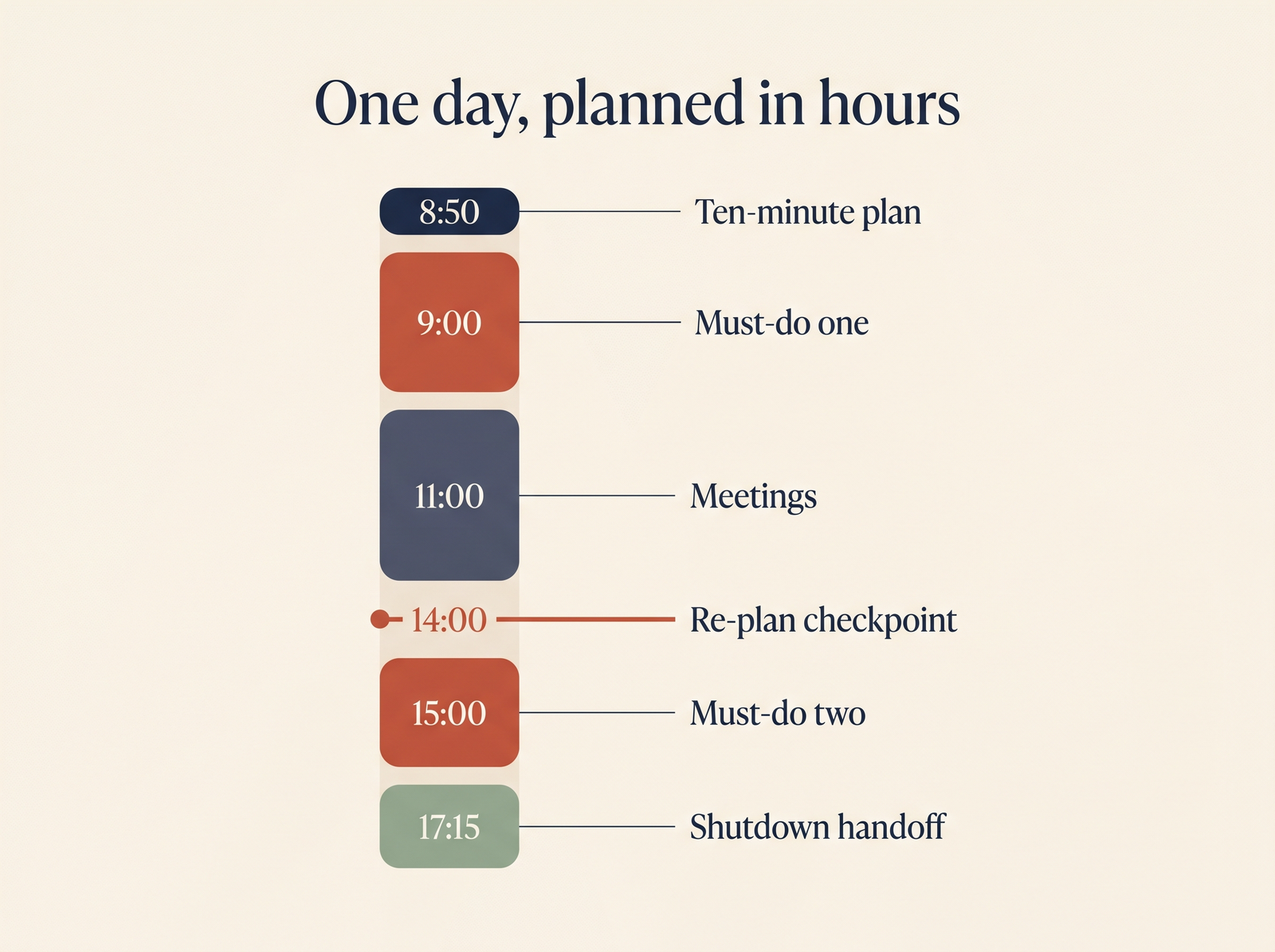
One planned day, top to bottom. The two checkpoints most routines leave out are the ones at 14:00 and 17:15.
Step four: the 2pm re-plan
This is the step I’d keep if I could keep only one.
Every day meets reality somewhere around lunch. A meeting ran over, a customer escalation ate an hour, the must-do took longer than the padded estimate. At that point people do one of two things: abandon the plan (“today’s a wash”) or keep grinding against a schedule that no longer exists. Morgen’s guide calls the first one all-or-nothing thinking and suggests building decision points into the day. Right diagnosis. Here’s what the decision point actually looks like.
At 2pm — or after your last morning meeting, whichever comes first — take ten minutes:
- Recount the hours. Same math as the morning, for what’s left of the day.
- Mark what’s done. Honestly. “Mostly done” is not done.
- Re-place the must-dos that are still standing. If one no longer fits, shrink it to a version that does (“draft the pricing section” instead of “write the proposal”) or move it to tomorrow — on purpose, with a time.
- Drop something. Out loud, in writing. There is almost always one small task that isn’t happening today. Choosing that is the whole point of the re-plan.
Here’s a real one:
| Planned at 8:50 | Re-planned at 14:00 | |
|---|---|---|
| Must-do 1: pricing draft | 9:00–10:30 | Done |
| Client call | 11:00–12:00 | Ran to 12:45 |
| Must-do 2: review Q4 roadmap | 13:00–14:30 | Moved to 15:00–16:15 |
| Must-do 3: hiring scorecard | 15:00–16:00 | Moved to tomorrow, 9:00 |
| Small tasks (5) | 16:00–17:00 | Three kept, two dropped |
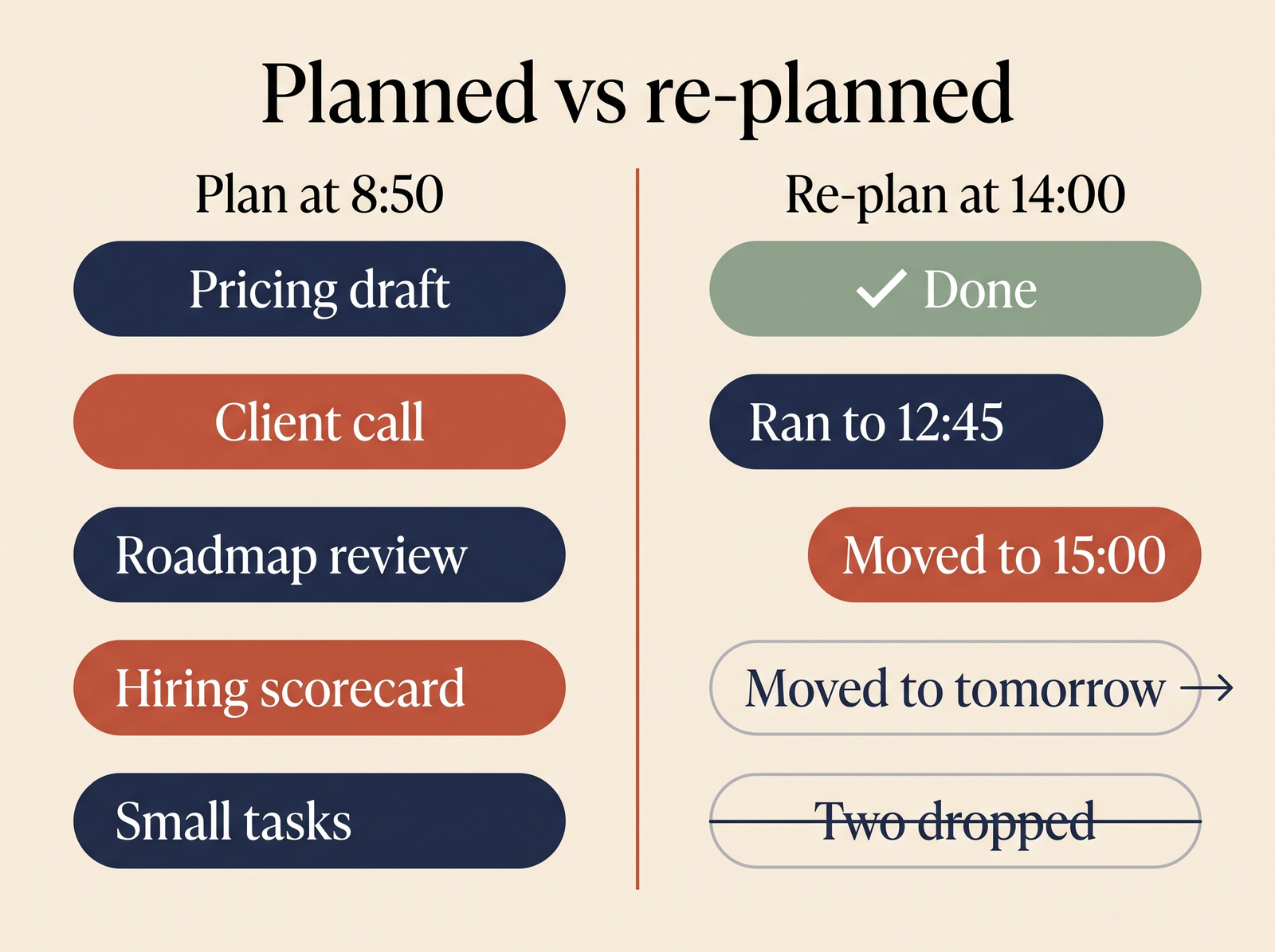
Same day, two versions. The re-plan doesn’t rescue everything — it decides what falls off instead of letting the clock decide.
That table is the difference between “I didn’t finish my plan” and “I finished the plan I made at 2pm”. The second one is true, and it doesn’t feel like failure.
This is also the step where software earns its keep. Re-placing blocks by hand is fine on a calm day and tedious on a bad one — exactly the day you need it most. I run my day in Fokus, and the 2pm checkpoint there is mostly a glance: when a meeting overruns, auto-scheduling rebuilds the rest of the day around the priorities, and “Optimize Schedule” redoes it in one click if I’ve changed my mind. I still make the drop decision myself. The tool moves blocks; it shouldn’t decide what matters.
Step five: the shutdown and the handoff
The end of the day is where tomorrow’s plan gets cheap or expensive. Five minutes, three moves:
- Close out today. Mark what’s done. For anything unfinished, pick one: tomorrow with a time, back to the backlog, or deleted. No silent rollovers — a task that has moved forward four days in a row is either too big or not actually important.
- Write tomorrow’s first move. Not “work on roadmap”. The first physical action: “open the roadmap doc, reread comments from Priya, answer the three about sequencing”. Tomorrow-you starts on a verb, not a decision.
- Glance at tomorrow’s calendar. Two minutes of capacity math now saves the morning surprise of a 9:00 meeting you’d forgotten.
The handoff is what makes the morning plan take ten minutes instead of thirty. Most of the decisions were made the evening before by someone who knew exactly how today went. The morning routine guide makes the same argument from the other end: the best mornings start the night before.
In Fokus, the End-of-Day Review is where I do this, and the next day’s Morning Briefing is where I pick it back up. The two close the loop: the review captures what’s unfinished, and the Morning Briefing walks me through the new day, surfaces what matters and gives the plan a score for how well it’s planned before I start.
Should you plan the night before or in the morning?
Both, split. The evening shutdown makes the decisions — what’s unfinished, what’s first. The morning pass checks them against reality: new meetings, overnight messages, how you actually feel. Evening-you knows what happened today; morning-you knows what’s happening now. Neither alone is enough.
If you can only do one, do the evening handoff. A morning plan without it becomes a thirty-minute negotiation with your inbox. And on Mondays, the day plan should come out of a weekly plan rather than from scratch — that’s where the must-dos for the week get chosen, and the daily routine just places them.
What is a good daily planning routine? The ten minutes, timed
For people who want the routine as a checklist:
| When | Step | Time |
|---|---|---|
| Morning | Capacity math: calendar, subtract, apply 80% | 2 min |
| Morning | Pick one to three must-dos that fit | 3 min |
| Morning | Block them, hardest first, leave buffer visible | 3 min |
| Morning | Check the handoff note, adjust for anything new | 2 min |
| ~14:00 | Re-plan: recount, re-place, drop one thing | 10 min |
| End of day | Shutdown: close out, write first move, glance at tomorrow | 5 min |
Twenty-five minutes across the whole day. The morning part is the ten minutes people mean when they ask about a daily planning routine; the other fifteen are what keep it true.
The named methods: the 8-minute method and the 3-3-3 rule
Two frameworks come up constantly in searches around day planning. Both are fine starting points, and both fit inside the routine above.
The 8-minute daily planning method comes from Grace Beverley’s Productivity Method planner, a lighter version of the framework in her book Working Hard, Hardly Working. It’s five minutes of planning in the morning and a three-minute check-in at the end of the day. In the morning you sort work by size — Quick Ticks under 5 minutes, Tasks of 5 to 30 minutes, Projects over 30 — choose three non-negotiables, block fixed commitments first, then time-block the three. It’s close to what I’ve described, minus two things: the explicit capacity math and a mid-day re-plan. Add those and it holds up on meeting-heavy days too.
The 3-3-3 rule at work has two versions circulating. The one covered in our time blocking guide is three hours on your most important project, three shorter urgent tasks, three maintenance tasks. Morgen’s guide describes a different one: three major tasks, three smaller tasks, three personal items. The first is more useful for work because it budgets hours, not just counts items. The second is really a list format. Check the three hours against your capacity number, though — on a day with four meetings, three hours of deep work may simply not exist.
Paper, calendar, or a planner app?
Whatever you’ll open at 2pm. That’s the real test.
- Paper is great for the morning pass and useless for the re-plan. You can’t move blocks on paper without rewriting the day.
- A calendar plus a notes list is where most people start. It can hold the plan, but the capacity math and every re-plan are yours to do by hand, which is exactly where the routine tends to slip on a busy day.
- A planner app that reads your calendar earns its place at the capacity step and the re-plan — the two steps that are arithmetic. That’s why I moved to Fokus. It also covers the part that isn’t arithmetic: its Morning Briefing is a calm, guided planning ritual that walks you through the day, surfaces what matters and gives the plan a score for the quality of the planning, so the morning pass starts from more than a blank page. I compared the main options in our guide to daily planner apps for professionals.
Fokus is free during its public beta, with no credit card, which answers the “is there a free daily planner app” question for this routine specifically.
Day planning FAQ
What is day planning? Deciding in advance how many hours you really have today and which one to three outcomes get them, then placing those outcomes on the calendar. It’s different from a to-do list, which has no idea how long your day is.
How long should planning your day take? About ten minutes in the morning, ten at the re-plan, five at shutdown. If the morning pass takes more than fifteen, the evening handoff is missing.
What if my day is mostly meetings? Do the math anyway. On a day with six hours of meetings, capacity might be forty minutes — plan one must-do that fits, or none. Knowing that at 9am is better than learning it at 5pm.
What is a good day planner for seniors, or for anyone who wants less tech? The routine matters more than the tool: count the hours, pick few things, check in once mid-day. A large-format paper planner with an hourly column can carry the morning pass, though it can’t re-plan. If one app is acceptable, pick a calm one: Fokus’s Day View shows one card at a time, and the Morning Briefing, which also comes as audio, walks you through the plan step by step.
What if I miss the 2pm re-plan? Do it whenever you notice. A re-plan at 4pm still beats none — it just has fewer hours to rescue.
The short version
Plan hours, not tasks. Count what the calendar leaves you, fill 80% of it, and pick one to three must-dos that fit. Block them, hardest first. Re-plan once in the afternoon and drop something on purpose. Close the day with a handoff so tomorrow starts on a verb.
A plan that survives 2pm isn’t a better plan. It’s one that was allowed to change.

Fokus Team
The Fokus Team
The team behind Fokus — building the smart productivity platform.